Introduction
隨意寫寫的筆記~
ES2020
Syntax
Class Private Variables
class Person {
	#age

	constructor(firstName, lastName, age) {
    this.firstName = firstName
    this.lastName = lastName
    this.#age = age
  }
}

const youcheng = new Person('YouCheng', 'hsu', 30)
console.log(youcheng.#age) //Private field '#age' must be declared in an enclosing class
Nullish Coalescing Operator
const youcheng = {
  firstName: 'YouCheng',
  lastName: ''
  age: 0
}

console.log(youcheng.firstName ?? 'YOU CHENG') //youCheng
console.log(youcheng.lastName ?? 'Hsu') //''
console.log(youcheng.age ?? 30) //0
console.log(youcheng.city ?? 'hsinchu') //hsinchu
Optional Chaining Operator
const youcheng = {
  sibling: {
    sister: 'vivien'
  }
}

console.log(youcheng?.sibling?.sister) //vivien
console.log(youcheng?.sibling?.brother) //undefined
console.log(youcheng?.parents?.father) //undefined
API
String.prototype.matchAll
const test = "climbing, oranges, jumping, flying, carrot";
const regex = /([a-z]*)ing/g;
const matches = Array.from(test.matchAll(regex));
const result = matches.map(match => match[1]);

console.log(result) //['climb', 'jump', 'fly']
import()
import('@/utils').then(utils => {
  console.log(utils.isSame(1, 1))
})
BigInt
- 數字尾端加個
n, 即為 BigInt BigInt(0)即為 BigInt- BigInt 不可與 Number 進行運算
- BigInt 不可使用 Math API 進行運算
- BigInt 不為 BigDecimal, 進行除法時 Decimal 無條件捨去
- 其他細節參考 MDN
BigInt(Number.MAX_SAFE_INTEGER) + 2n //9007199254740996n
Number.MAX_SAFE_INTEGER + 2 //TypeError: can't convert BigInt to number
Promise.allSettled
enum PromiseStatus {
  FULFILLED = 'fulfilled',
  REJECTED = 'rejected'
}

interface FulfillResult<R = any> {
  status: PromiseStatus.FULFILLED
  value: R
}

interface RejectResult<R = any> {
  status: PromiseStatus.REJECTED
  reason: R
}

declare Promise {
  function allSettled(...args: Promise[]): Promise<(FulfillResult | RejectResult)[]>
}
globalThis
console.log(globalThis === window) //true

globalThis.youcheng = {}
console.log(globalThis.youcheng === window.youcheng) //true
import.meta
可以使用 import.meta 存取類似 nodejs 中的 __dirname, __filename
以 __dirname 為例:
import(new URL('./static/js/home.js', import.meta.url))
React Context in Vue
What is React Context ?
Context provides a way to pass data through the component tree without having to pass props down manually at every level.
How to use React Context ?
Similar to Redux (Vuex)
graph TB

subgraph Provider
n1[App]
end

n2[View]

subgraph Consumer
n3[Button]
end

subgraph Consumer_
n4[Label]
end

n1-->n2
n2-->n3
n2-->n4
React Context in Vue
provide and inject in Vue option:
-
App
<script> export default { name: 'App', data() { return { count: 0 } }, provide() { const context = {} Object.defineProperties(context, { count: { enumerable: true, get() { return this.count }, set(val) { return this.count = val } } }) return context } } </script> -
Button
<script> export default { name: 'Button', inject: { count: { default: 0 } } methods: { // 點擊更新 Button.count, 帶動更新 App.count onClick() { this.count++ } } } </script> -
Label
<script>
export default {
  name: 'Label',

  inject: {
    // App.count 更新, 驅動 Label rerender
    count: {
      default: 0
    }
  }
}
</script>
Wrap it up
Separate Provider's logic from App
-
Provider
export function provideContext() { // create reactive object const store = new Vue({ data() { return { count: 1 }; } }); return { context: store }; } export function consumeContext() { return { context: { default: { count: 0 } } }; } -
App
<script> import { provideContext } from '/somewhere/Context' export default { name: 'App', data() { return { count: 0 } }, provide: provideContext } </script> -
Label and Button
<script>
import { consumeContext } from '/somewhere/Context'
export default {
  inject: {
    ...consumeContext()
  }
}
</script>
When to use
處理需要跨元件的值且:
- 更新頻率不高
- 非全局環境需要
When to use reactive provide/inject
- Do you need to avoid prop drilling? — It can get tedious to pass a prop down through layer after layer of components, especially when those intermediate components don’t actually use the prop. This can also be solved by Vuex, but you sometimes want a simpler and lighter solution
- Are the components tightly coupled? — If you have a set of components that will always be used together, then it’s okay to rely on provide/inject to pass some of the data around. Otherwise, it’s best to stick with props and events, which is what most other components will be using
- Is Vuex overkill? — Vuex is a great tool, but if you’re dealing with something that has a simple state, then Vuex is overkill and introduces a lot of overhead. If the set of components needs to be reusable, then coupling it with Vuex also introduces unnecessary complexity
- Is the data contained within a few components? — If the data being passed around is only used by a couple components, then this solution can make sense. But if the data being used here is used elsewhere, keeping it higher up in the tree or using Vuex can be better solutions
Caution
two-way binding
RxJS
以訂閱+推播的方式管理數據
Observable
用來推播數據的東西。
- 推播數據的方式可以 sync/async,端看實作的方式。
- 使用
subscriber.next()推播數據。 subscriber.complete()後的subscriber.next()不會被推播。- 可以使用
subscriber.error()拋錯。
import { Observable } from 'rxjs'

const observable = new Observable(subscriber => {
  subscriber.next(1)
  subscriber.next(2)
  setTimeout(() => {
    subscriber.next(3)
    subscriber.complete()
    subscriber.next(4)
  })
})
Observer
用來接 Observable 的東西,由 next、error、complete 三個 API 組成。
import { Observable } from 'rxjs'

const observer = {
  next(v) { console.log(`next value: ${v}`) },
  error(err) { console.log(`error: ${err}`) },
  complete() { console.log('complete') }
}

const observable = new Observable((subscriber) => {
  subscriber.next(1)
  subscriber.next(2)
})

observable.subscribe(observer)
實務上也可以單純是個 function
observable.subscribe((v) => console.log(`next value: ${v}`))
Operator
Operator 為用來產生 Observables 的 methods,分成兩類-Pipeable Operators 及 Creation Operators。
Pipeable Operators
可以透過 observableInstance.pipe(operator()) 使用。Pipeable Operator 將 Observable 作為 Input,並回傳新的 Observable。
observableInstance.pipe(
	operator1(),
	operator2(),
	operator3(),
)
Creation Operators
可以獨立使用,產生 Observable。
import { interval } from 'rxjs'

const observable = interval(1000)
Higher-order Observables
接手 Observable 的 Observable
例如|發放 URL 的 Observable 被執行 URL 的 Observable 接手
const fileObservable = urlObservable.pipe(
	map(url => http.get(url)),
  concatAll(),
)
Subscription
observable.subscribe() 的回傳值,可以用來:
- 取消/終止 Observable
- 增加/移除 childSubscription
import { interval } from 'rxjs';

const observable1 = interval(400);
const observable2 = interval(300);

const subscription = observable1.subscribe(x => console.log('first: ' + x));
const childSubscription = observable2.subscribe(x => console.log('second: ' + x));

subscription.add(childSubscription);

setTimeout(() => {
  // Unsubscribes BOTH subscription and childSubscription
  subscription.unsubscribe();
  // subscription.remove(childSubscription)
}, 1000);
Subject
- 可以把資料發給其他 Observables 使用的 Observable。
- 比較像 EventEmitters。
- 同時身兼 Observable 及 Observer 身份。
- Observer 只能存取到 subscribe 後執行的
next()派發的值。
import { Subject } from 'rxjs'

const subject = new Subject<number>()

// MARK: Subject as Observable

subject.subscribe((v) => console.log(`observer A: ${v}`))
subject.subscribe((v) => console.log(`observer B: ${v}`))

// MARK: Subject as Observer

subject.next(1)
subject.next(2)

// Logs:
// observerA: 1
// observerB: 1
// observerA: 2
// observerB: 2
因為是 Observer,所以可以配合 Observable.prototype.subscribe() 使用:
import { Subject, from } from 'rxjs'

const subject = new Subject<number>()

// MARK: Subject as Observable

subject.subscribe((v) => console.log(`observer A: ${v}`))
subject.subscribe((v) => console.log(`observer B: ${v}`))

// MARK: Subject as Observer

const observable = from([1, 2, 3])
observable.subscribe(subject)

// Logs:
// observerA: 1
// observerB: 1
// observerA: 2
// observerB: 2
// observerA: 3
// observerB: 3
multicast Observable
muticast operator observable 類似 source observable 及 subject observable 的中間層:
- 可以透過
multicast.subscribe達到同subject.subscribe(someObserver)的效果。 - 可以透過
multicast.connect達到同source.subscribe(subject)的效果。
import { from, Subject } from 'rxjs'
import { multicast } from 'rxjs/operators'

const subject = new Subject<number>()
const source = from([1, 2, 3])
const multicasted = source.pipe(multicast(subject))

// MARK: Multicast proxy to Subject (Subject as Observable)

multicasted.subscribe((v) => console.log(`observer A: ${v}`))
multicasted.subscribe((v) => console.log(`observer B: ${v}`))

// MARK: Multicast proxy to Source (Subject as Observer)

const subscriptionConnet = multicasted.connect() // start execution
// subscriptionConnet.unsubscribe()

// Logs:
// observerA: 1
// observerB: 1
// observerA: 2
// observerB: 2
// observerA: 3
// observerB: 3
refCount Observable
refCount 會在被 subscribe 時自動呼叫 multicast.prototype.connect() 並在 subscribe 降為 0 時自動 multicast.prototype.connect().unsubscribe()。
import { interval, Subject } from 'rxjs'
import { multicast, refCount } from 'rxjs/operators'

const subject = new Subject<number>()
const source = interval(500)
const refCounted = source.pipe(
  multicast(subject),
  refCount()
)

console.log('Start connect after subscribe')
const subscriptionA = refCounted.subscribe((v) => console.log(`observer A: ${v}`))

let subscriptionB
setTimeout(() => {
	subscriptionB = refCounted.subscribe((v) => console.log(`observer B: ${v}`))
}, 1000)

setTimeout(() => {
  subscriptionA.unsubscribe()
  console.log('Unsubscribe Observer A')
}, 2000)


setTimeout(() => {
  subscriptionB.unsubscribe()
  console.log('Unsubscribe Observer B')
  console.log('Stop connection after unsubscribe all')
}, 3000)
BehaviorSubject
會暫存當前的數值,新訂閱的用戶必定會觸發一次 next()。
import { BehaviorSubject } from 'rxjs';
const subject = new BehaviorSubject(0); // 0 is the initial value

subject.subscribe((v) => console.log(`observerA: ${v}`));

subject.next(1);
subject.next(2);

subject.subscribe((v) => console.log(`observerB: ${v}`));

subject.next(3);

// Logs
// observerA: 0
// observerA: 1
// observerA: 2
// observerB: 2
// observerA: 3
// observerB: 3
ReplaySubject
功能跟 BehaviorSubject 差不多,但可以定義要記錄幾個值、多少時間內的值。
import { ReplaySubject } from 'rxjs';
const subject = new ReplaySubject(3, 100); // buffer 3 values for new subscribers

subject.subscribe({
  next: (v) => console.log(`observerA: ${v}`)
});

subject.next(1);
subject.next(2);
subject.next(3);
subject.next(4);

subject.subscribe({
  next: (v) => console.log(`observerB: ${v}`)
});

subject.next(5);

// Logs:
// observerA: 1
// observerA: 2
// observerA: 3
// observerA: 4
// observerB: 2
// observerB: 3
// observerB: 4
// observerA: 5
// observerB: 5
AsyncSubject
只有在呼叫 compelete() 後會將最後一次 next() 的值拋給 Obsserver。
Scheduler
用來控制 Subscription 何時開始、何時派發資料(when notifications are delivered.)。
- Scheduler 是一個資料結構。 它知道如何根據優先級或其他標準來儲存並佇列任務。
- Scheduler 是一個執行環境。 它意味著任務何時何地被執行,比如像是 立即執行、在回呼(callback)中執行、setTimeout 中執行、animation frame 中執行
- Scheduler 是一個虛擬時鐘。 它透過
now()這個方法提供了時間的概念,我們可以讓任務在特定的時間點被執行。
Reference https://ithelp.ithome.com.tw/articles/10188988
每個 operator 都有預設的 Scheduler,在使用時也可以定義要使用哪些 Scheduler。根據 Operator 的特性,會有不同的預設 Scheduler。
Creation Operator 通常可接受 Scheduler 做為參數。
subscribeOn
定義 subscribe() 實際執行時機。
- 預設情況下,呼叫
subscribe()後會馬上執行。
observeOn
定義通知發送的時機。
- 夾在 Observer 及 Observable 中間。
Single SPA
-
Root App 不建議採用任何前端框架(React, Vue, Angular...)
-
不建議共用 state, 會造成 Child App 間耦合
- 如何達成共用 state
- Solution 1: 寫成共用的 API library
- Solution 2: Export/Import
- Custom Browser Events
- 儲存在 Cookie, LocalStorage, SessionStorage
- 如何達成共用 state
-
可以把 Child App 拆成不同 Repo, 並用 SystemJS + CI 串起來
- 用 CI 上傳新的 Import Map
-
可以使用 create-single-spa 創建專案
-
Code Splits
Set the
__webpack_public_path__dynamically so webpack knows where to fetch your code splits
Recommended Setup
- 設定為 SystemJS(or ES Module)+ Import Map 的好處
- 共用 Library 好維護
- 共用 Code 好維護
- 各自(Child App)為政
- 主要是作為 ES Module 的替代方案
- In-Browser vs Build-Time Module:可以使用 Webpack Externals, Rollup Externals 處理
- Single-SPA 本身:In-Browser Module
- 大型共用框架(React, Vue, Angular...):In-Browser Module
- 其他有的沒的:Build-In Module
- Module Federation vs Import Map
- Module Federation:Webpack 新功能,可以讓 children app 共用相同的 library、不重複下載。
- Module Federation 跟 Import Map 二擇一。
- SystemJS:提供 polyfill-like 的 Import Map 解決方案。
- Lazy Load:single-spa loading functions
- 開發過程:建議只運行正在經手的 child app(microfrontend),其他 children app 透過 Import Map 處理。
- Import Map 中其他 child app 指向已經部署上線的服務。
- Bundle Tool:建議用 Webpack。
output.libraryTarget: 'system'- single entry
- 不要使用
optimization - the systemjs docs for webpack
- systemjs-webpack-interop
- 停用 webpack hashing,production 再透過 ci 加上就好。
- Webpack Dev Server Setup:...。
- Webpack External 確認是否設定正確(共用 library 之類的)。
- Unique
jsonpFunction/output.libraryfor every microfrontend's bundle.
- Utility Module:跨 microfrontend 共用的 API. 須妥善設定 External 及 Import Map。
- Shared Dependency:Module Federation、Import Map 二選一。
- Shared Dependency 可以自己一個 repo 用 Import Map 管理。
- Prefer splitting microfrontends by route, instead of by components within a route.
- Create utility modules for your core component library / styleguide, for shared authentication / authorization code, and for global error handling.
- If you are only using one framework, prefer framework components (i.e. React, Vue, and Angular components) over single-spa parcels.
Introduction
import Vue from "vue";
import Vuex from "vuex";

Vue.use(Vuex);

const store = new Vuex.store(/* ... */)

const app = new Vue({
  store
})
State
Single Source State
// Vuex Setting

import Vuex from 'vuex'

const store = new Vuex.store({
  state: { count: 0 }
})

// Component

const componentOption = {
  computed: {
    count() { return this.$state.count }
  }
}
使用 mapState(...) API 簡化綁定過程
import { mapState } from 'vuex'

const componentOption = {
  computed: {
    ...mapState(['count']),
    ...mapState({
      aliasCount: 'count',
      functCount: state => state.count
    })
  }
}
Getter
形同 vue component option 中的 computed
// Vuex Setting

import Vuex from 'vuex'

const store = new Vuex.store({
  state: { count: 0 },
  getters: {
    text(state, getters) { return `Count: ${state.count}` },
    decoText(state, getters) { return `Deco ${getters.text}` }
  }
})

// Component

const componentOption = {
  computed: {
    text() { return this.$store.state.getters.text }
  }
}
Method-Style Access
使用 function 的方式調用 getter,且可以傳遞參數:
// Vuex Setting

import Vuex from 'vuex'

const store = new Vuex.store({
  state: { count: 0 },
  getters: {
    text(state, getters) {
      return (prefix) => `${prefix} Count: ${state.count}`
    }
  }
})

// Component 中調用

store.getters.text('Hola')
使用 mapGetters 簡化綁定過程
用法同 mapState:
import { mapState } from 'vuex'

const componentOption = {
  computed: {
    ...mapGetters(['text'])
  }
}
Mutation
- 在 Mutation 內部修改 state。
- mutation 內部的實作必須為 sync 的。
- mutation 的名稱建議設置為常數以便存取。
// Vuex Setting

import Vuex from 'vuex'

const INCREMENT = 'increment'
const VALUE = 'value'

const store = new Vuex.store({
  state: { count: 0, value: "" },
  mutation: {
    [INCREMENT](state) { state.count++ },
    // 可以傳遞參數 val
    [VALUE](state, payload) { state.value = payload.value }
  }
})

// Component 中調用

this.$store.commit(INCREMENT)
this.$store.commit(VALUE, { value: 'Hola' })
this.$store.commit({ type: VALUE, value: 'Hola' })
使用 mapMutations 綁定
// Component

import { mapMutations } from 'vuex'

const componentOption = {
  methods: {
    ...mapMutations([add]),
    callAdd() {
      // Mapping 後的呼叫方式
      this.add();
    }
  }
}

const componentOption = {
  data() {
    return { input: String }
  },
  methods: {
    ...mapMutations({
      add: INCREMENT,
      input: VALUE
    })
	}
}

// Component 中調用

this.add()
this.input(input)
Action
- 內部實作可為 async 的 mutation。
- 內部實作調用 mutation。
- 元件中呼叫
store.dispatch調用 action。 - 可以在 action 中透過
dispatch,呼叫其他 action。 store.dispatch(/* ... */)回傳Promise,可以依此來進行 async 行為設計(例如相依的修改、有優先順序的 ajax)。
// Vuex Setting

const INCREMENT = 'increment'

const store = new Vuex.store({
  state: { count: 0 },
  mutations: {
    [INCREMENT](state) { state.count++ }
  },
  actions: {
    [INCREMENT]({ commit, dispatch, state }, payload) { setTimeout(() => commit('increment'), 1000) }
  }
})

// Component 中調用

this.$store.dispatch(INCREMENT)
使用 mapActions 綁定
用法同 mapState
// Component

import { mapActions } from 'vuex'

const componentOption = {
  methods: {
    ...mapActions([INCREMENT])
  }
}
Modules
讓你可以依據設計將 store 的設計拆分。
const moduleA = {
  state: { /* ... */ },
  mutations: { /* ... */ },
  actions: { /* ... */ },
  getters: { /* ... */ }
}

const moduleB = {
  state: { /* ... */ },
  mutations: { /* ... */ },
  actions: { /* ... */ }
}

const store = new Vuex.Store({
  modules: {
    a: moduleA,
    b: moduleB
  }
})

store.state.a // -> `moduleA`'s state
store.state.b // -> `moduleB`'s state
module 內部實作時各 API 得到的第一個參數皆指向 module 內部的 scope。
const moduleA = {
  state: { count: 0 },
  mutations: {
    // state 為 moduleA scope
    increment(state) {
      state.count++
    }
  },
  getters: {
    /*
     * state, getter 為 moduleA scope
     * rootState, rootGetter 為 root scope
     */
    doubleCount(state, getters, rootState, rootGetter) {
      return state.count * 2
    }
  },
  actions: {
    /**
     * state, getter 為 moduleA 內部
     * rootState, rootGetter 為 root scope
     */
    incrementIfOddOnRootSum ({ state, getter, commit, rootState, rootGetter }) {
      if ((state.count + rootState.count) % 2 === 1) {
        commit('increment')
      }
    }
  }
}
Namespacce
預設情況下,不同 modules 的 getters、mutations、actions 都會被註冊在 global namesapce:
const moduleA = {
  getters: {
    holaA() { return 'Hola in ModuleA' }
  }
}

const moduleB = {
  getters: {
    holaB() { return 'Hola in ModuleB' }
  }
}

const store = new Vuex.store({
  modules: {
    a: moduleA,
    b: moduleB
  }
})

store.getters.holaA;
store.getters.holaB;
如果要將某 module 自 global 中拆開,則在該 module 中設定 namespace: true:
const moduleA = {
  namespaced: true,
  getters: {
    holaA() { return 'Hola in ModuleA' }
  }
}

const moduleB = {
  getters: {
    holaB() { return 'Hola in ModuleB' }
  }
}

const store = new Vuex.store({
  modules: {
    a: moduleA,
    b: moduleB
  }
})

store.getters['a/holaA'];
store.getters.holaB;
在 Namespace 中呼叫 root 中的 mutations, actions
在 module 中如果要使用 root 上的 mutations, actions 時, 在 commit(/* ... */) 第三參數傳入 { root: true}
import Vuex from 'vuex'

const moduleA = {
  namesapced: true,

  state: { value: 'A' }

  mutations: {
    ['UPDATE'](state, payload) { state.value = payload.value }
  },

  actions: {
    ['UPDATE_ROOT_VALUE'](context, payload) {
      // 呼叫 root 中的 'UPDATE' commit, 本例中應為 moduleB.mutations['UPDATE']
      context.commit('UPDATE', payload, { root: true })
    }
  }
}

const moduleB = {
  state: { value: 'B' },

  mutations: {
    ['UPDATE'](state, payload) { state.value = payload.value }
  }
}

const store = new Vuex.Store({
  modules: {
    moduleA,
    moduleB
  }
})

store.dispatch('moduleA/UPDATE_ROOT_VALUE', { value: 'hello world!!' })
console.log(store.state.moduleB.value) // hello world!!
在 Namespace Module 中註冊全局的 action
import Vuex from 'vuex'

const moduleA = {
  namesapced: true,

  state: { value: 'A' }

  mutations: {
    ['UPDATE'](state, payload) { state.value = payload.value }
  },

  actions: {
    ['UPDATE_FROM_GLOBAL_SCOPE'] {
      root: true,
      handler(context, payload) {
        context.commit('UPDATE', payload)
      }
    }
  }
}

const store = new Vuex.Store({
  modules: { moduleA }
})

store.dispatch('UPDATE_FROM_GLOBAL_SCOPE', { value: 'hello world!!' });
console.log(store.state.moduleA.value) // hello world!!
使用 mapState, mapMutations, mapActions 快速註冊 Namespace Module
interface mapState<S> {
  (
    modulePath: string, // 例如: 'moduleA'
    bindedState: Array<keyof S> | Object<string, (keyof S | (state: S) => any)>
	): Object<string, any>
}

interface mapMutations<S> {
  (
    modulePath: string,
    bindedState: Array<keyof S> | Object<string, (keyof S | (commit, ...args: any[]) => void)>
	): Object<string, Function>
}

interface mapActions<S> {
  (
    modulePath: string,
    bindedState: Array<keyof S> | Object<string, (keyof S | (dispatch, ...args: any[]) => void)>
	): Object<string, Function>
}
Dynamic Register Module
import Vuex from 'vuex'

const store = new Vuex.Store({})

const moduleA = /* 某個 module */
store.registerModule('moduleA', moduleA)

const childModule = /* moduleA 的子 module */
store.registerModule(['moduleA', 'childModule'], childModule)
如果註冊 moduleA 之前已從 server-side render 拿到 moduleA 的 state 值, 可以在 dynamic registration 時予以保留:
store.registerModule('moduleA', moduleA, { preserveState: true });
State Pollution
如果重複註冊同個 module,如果 module 中的 state 宣告為 Object,則會造成 State Pollution,因此建議 state 宣告為 function:
const moduleA = {
  state() { return { value: 'A' } }
}
Hot Reload
import Vuex from 'vuex'

const store = new Vuex.Store({ /* ... */ })

import('./newModules')
	.then(module => {
		store.hotUpdate({ /* ...同 Vuex.Store 的參數 */ })
	});
Webpack 5 異動
General Direction
- Improve build performance with Persistent Caching.
- Improve Long Term Caching with better algorithms and defaults.
- Improve bundle size with better Tree Shaking and Code Generation.
- Improve compatibility with the web platform.
- Clean up internal structures that were left in a weird state while implementing features in v4 without introducing any breaking changes.
- Prepare for future features by introducing breaking changes now, allowing us to stay on v5 for as long as possible.
Long Term Caching
Chunk, Module IDs and Export names deterministic
- module, chunk ID: 3-5 碼的數字。
- exports name: 2 碼字串。
{
	chunkIds: 'deterministic',
	moduleIds: 'deterministic',
	mangleExports: 'deterministic'
}
Real Content Hash
-
使用真的 hash 值處理
[contenthash]。 -
minimizing 後可能效果不明顯。
Development Support
Named Chunk IDs
使用人類可以看懂的方式命名 chunk id。
A Module ID is determined by its path, relative to the
context. A Chunk ID is determined by the chunk's content.
一般情況下可以不用再使用 import(/* webpackChunkName: "name" */ "module") 來除錯。
Module Federation
-
新功能;可以讓不同的 webpack build 合作無間。
-
參考這份文件。
New Web Platform Features
JSON Modules
-
一定要有
default exports。 -
named exports在 strict ECMAScript module 中不得使用。
import.meta
import.meta.webpackHot===module.hotimport.meta.webpack:當前 webpack 版本import.meta.url:file:URL
Asset modules
原生支援 assets module,可以透過以下語法存取 assets。
import url from './image.png':現行語法,需配合module.rules設定。new URL('./image.png', import.meta.url):即使不進行 bundle 也可運行。
Native Worker support
- 如果以
new URL('./worker.js', import.meta.url)的語法使用 Worker,Webpack 會將其中的 js 檔視為 entry point。 new URL()語法可以直接在 browser 中執行。
URIs
import fromData from 'data:text/javascript;export default 2020'
import fromFile from 'file://xxx.xxx.xxx'
import fromHttp from 'https://xxx.xxx.xxx'
Async Modules
可以透過以下語法使用 async module
import()require():回傳 Promise
可以在以下情境使用
- async externals
- WebAssembly Module
- ECMAScript Modules that are using Top-Level-Await
External
看不懂
New Node.js Ecosystem Features
- 支援
package.json中的exports、imports欄位。 - 支援 Yarn PnP
- 參考這份文件。
Development Experience
Improved target
可以指定版本 ,例如target: ['web', 'es2020']、target: 'node14'
Stats
不想看這段
Progress
原本用在 CLI --progress 指令的 ProgressPlugin 可以透過 plugin 設定。
- 除了計次已經處理的
modules,現在也可以計次entries、dependencies(預設值)。 - 原本的進度 console 增加 500ms throttle。
- profile mode 顯示槽狀 progress message。
percentBy: string可以定義進度的計算方式
Automatic unique naming
如果同時存在複數個 webpack runtime, 預設以 package.json 的 name 作為 output.uniqueName 的值。
Automatic public path
Typescript typings
Optimization
Nested tree-shake
b 會被移除
// inner.js
export const a = 1
export const b = 2

// module.js
export * as inner from './inner'

// user.js
import * as module from './module'

console.log(module.inner.a)
Inner-module tree-shake
optimization.innerGraph 為 true 時,會將 printHello 及 hello 標記為未被使用的 。
// inner.js
export function hola() {
  return 'hola'
}

export function hello() {
  return 'hello'
}

// module.js
import * as inner from './inner'

export function printHola() {
  console.log(inner.hola())
}

export function printHello() {
  console.log(inner.hello())
}

// app.js
import * as module from './module'

module.printHola()
optimization.sideEffects 為 false 時,會將 printHello 及 hello 移除。
以下語法能夠被識別:
-
function declarations
-
class declarations
-
export defaultwith or variable declarations with -
function expressions
- class expressions
- sequence expressions
/*#__PURE__*/expressions- local variables
- imported bindings
CommonJs tree-shake
以下語法可以被識別:
exports|this|module.exports.xxx = ...exports|this|module.exports = require("...")(reexport)exports|this|module.exports.xxx = require("...").xxx(reexport)Object.defineProperty(exports|this|module.exports, "xxx", ...)require("abc").xxxrequire("abc").xxx()- importing from ESM
require()a ESM- flagged exportType (special handling for non-strict ESM import):
Object.defineProperty(exports|this|module.exports, "__esModule", { value: true|!0 })exports|this|module.exports.__esModule = true|!0
- It's planned to support more constructs in future
General Tree Shaking improvements
可以對 export * 進行 tree-shake
可以手動使用 /* webpackExports: ["abc", "default"] */ 對 import() 進行 tree-shake
Improved Code Generation
以下編譯後語法簡化:
| Before | After |
|---|---|
Object(...) | Object(0, ...) |
r.d(x, 'a', () => a);r.d(x, 'b', () => b); | r.d(x, {a: () => a, b: () => b}) |
可以透過 output.environment 或是 target 來設定哪些 ECMAScript 功能/語法可以使用。
拍照 in HTML5
Desktop
// MARK: ViewFinder

const player = document.createElement('video')

// MARK: Switch

const switchOn = document.createElement('button')
switchOn.addEventListener('click', (e) => {
	navigator.mediaDevices
  	.getUserMedia({ video: true })
		.then((stream) => player.srcObject = stream)
})

const switchOff = document.createElement('button')
switchOn.addEventListener('click', (e) => {
  player.srcObject.getVideoTracks().forEach((track) => track.stop())
})

// MARK: Shutter

const shutter = document.createElement('button')
shutter.addEventListener('click', (e) => {
  const canvas = document.createElement('canvas')
  const context = canvas.getContext('2d')
  const { width, height } = player.getBoundingClientRect()
  context.drawImage(player, 0, 0, width, height)

  canvas.toBlob((blob) => {
  // NOTE: Export as `File`
    console.log(new File([blob], 'filename.png', {
      type: 'image/png'
    }))
  })

  // NOTE: Export as **base64**
  console.log(canvas.toDataURL())
})
Mobile
const input = document.createElement('input')
input.setAttribute('type', 'file')
input.setAttribute('accept', 'image/*')
input.setAttribute('capture', 'true') // value 可以為 `user` 或 `environment`
input.addEventListener('change', (e) => {
  // NOTE: Export as `File`
  console.log(e.target.files[0])
})

// MARK: Shutter

const shutter = document.createElement('button')
shutter.addEventListener('click', (e) => {
  input.click()
})
Reference
- https://developers.google.com/web/fundamentals/media/capturing-images
- https://developer.mozilla.org/en-US/docs/Web/API/MediaDevices/getUserMedia
CSS 相容性設計
檢查目標瀏覽器對屬性的相容性
- CanIUSE
- usage relative
- gs.statcounter.com
- MDN
- 各瀏覽器公司的網站...
確保各個瀏覽器顯示 “正常”
瀏覽器不支持
border-radius? 安啦~沒有圓角看起來還是正常的~不影響使用~
完全沒有 CSS 時, 網頁的內容呈現仍需要保有可讀性
- 嘗試註釋掉不支持的屬性看看狀況; 或是在瀏覽器開關 css 的屬性
- Perfect —> OK: 小細節的差異過省略, 例如圓角
CSS Override
/**
 * 此處的 display: flex 用於處理垂直置中;
 * 不支援 flex 的瀏覽器吃到 padding: 2em 0 的設定, 雖不完全置中,
 * 但也接近原始設計
 */
padding: 2em 0;
display: flex;
/*
 * 不支援 vh 單位的瀏覽器會吃到 height: 500px 的設定
 * 而 height: 500px 就呈現上還可接受
 */
height: 500px;
height: 100vh;
Feature Query
/**
 * 當 initial-letter: 4 在運行的瀏覽器支援下, 才執行 {} 中的設定
 */
@supports(initial-letter: 4) {
	...
}
@supports(PROPERTY_1: VALUE) or (PROPERTY_2: VALUE) {
	...
}
@supports(PROPERTY_1: VALUE) and (PROPERTY_2: VALUE) {
	...
}
@supports not (PROPERTY: VALUE) {
	...
}
不建議使用 Feature 的場合
@supports not (PROPERT: VALUE) {…}- 不是所有瀏覽器支援- 比
@supports早支援的屬性
Source Order — 保有 HTML 的可讀性
- 沒有 CSS 的狀況: Reader 或 朗讀器
JavaScript Strict Mode
語意上的修正:
- Slient Error → Throw Actual Error。
- 修正會影響 JavaScript 引擎最佳化的錯誤 (Mistake)。有時程式在 Strict Mode 執行效率較高。
- 禁用未來可能會被加入 ECMAScript 的語法作為變量/屬性/function 名稱。
優點
-
Securing JavaScript。
Strict mode makes it easier to write "secure" JavaScript. Some websites now provide ways for users to write JavaScript which will be run by the website on behalf of other users. JavaScript in browsers can access the user's private information, so such JavaScript must be partially transformed before it is run, to censor access to forbidden functionality. JavaScript's flexibility makes it effectively impossible to do this without many runtime checks. Certain language functions are so pervasive that performing runtime checks has a considerable performance cost. A few strict mode tweaks, plus requiring that user-submitted JavaScript be strict mode code and that it be invoked in a certain manner, substantially reduce the need for those runtime checks.
-
為未來版本的 ECMAScript 做準備。
使用方式
-
在文件上寫
"use strict",作用於全文件內。-
如果同時引用 a.js 及 b.js,僅在 a.js 撰寫
"use strict",且 a.j 引用先於 b.js,strict mode 僅作用於 a.js 內。 -
This syntax has a trap that has already bitten a major site: it isn't possible to blindly concatenate non-conflicting scripts. Consider concatenating a strict mode script with a non-strict mode script: the entire concatenation looks strict! The inverse is also true: non-strict plus strict looks non-strict. Concatenation of strict mode scripts with each other is fine, and concatenation of non-strict mode scripts is fine. Only concatenating strict and non-strict scripts is problematic. It is thus recommended that you enable strict mode on a function-by-function basis (at least during the transition period).
-
-
在 function scope 寫
"use strict",作用於 function scope 內。 -
Module 必為 strict mode
//宣告先於 use strict, 因此不會報錯
var let = 1;

"use strict";

//宣告後於 use strict, 因此報錯
var class = 2;
FEATURES
Properties and Variables
-
不可設定值給未宣告的變數。
"use strict"; //Throw ReferenceError a = 123; -
不可賦值給 non-writable 的變數/屬性。
"use strict"; let idCard = { name: "許祐誠" }; Object.defineProperty(idCard, "num", { value: "ABCD1234", writable: false }); //Throw TypeError idCard.num = "BBB"; -
不可
deleteundeletable 的變數/屬性。- Prototype
-
以 literal 方式宣告 Object 時,其中的屬性名稱不可重複。
"use strict"; //Throw Error const person1 = { name: "Maw", name: "Arren" } -
function 的 parameter name 必須為唯一。
"use strict"; //Throw Error function hello(name, name) { //... } -
不可設定屬性給 Primitive Value。
"use strict"; var idCard = 12345; //Throw TypeError idCard.name = "許祐誠" -
不可使用 syntax (包括未來的 ECMAScript syntax) 關鍵字作為變量/屬性名稱。
arguments、eval、class、const、let⋯等。
Syntax
-
0*及"\*"的 octal syntax 禁用,須改用 ECMAScript 5 的0o-*syntax。"\045" === "%"→0o045 === "%"
-
禁用
withsyntax。 -
eval不添加變量至 scope。eval自成一個 Block{}
//Sloppy Mode var x = 17; eval("var x = 42;"); //Result is false; console.log(x === 17); //Strict Mode "use strict"; var x = 17; eval("var x = 42;"); //Result is true; console.log(x === 17); -
不能
deleteplain names。"use strict"; var a = "A"; //Throw SyntaxError delete a; function testDelete() { var b = "A"; //Throw SyntaxError delete b; }
function 中的 arguments
-
不可
delete arguments -
在 function 中,如果參數在 scope 內被修改了,其相對應的
arguments不會跟著修改。"use strict"; function hello (name) { name = "Maw"; console.log(`Hello, ${name} (name)`); console.log(`Hello, ${arguments[0]} (arguments[0])`) } hello("Arren"); //Hello, Maw (name) //Hello, Arren (arguments[0]) -
不支援
arguments.callee。arguments.callee:當前正在執行的 function 本身。
-
不支援
arguments.caller。
Logic
-
當 function 與
null、Boolean、undefined進行綁定時(call、apply、bind);或 function 屬於 global scope 時, function 的this為null。"use strict"; function testThis() { return this; } testThis();//回傳 null testThis.call(false);//回傳 null testThis.call(true);//回傳 null testThis.apply(null);//回傳 null testThis.bind(undefined)();//回傳 null -
不可在判斷語句中宣告 function (測不出來)
"use strict";

if (true) {
    //SyntaxError
    function f() {}

    f();
}

for (let i = 0; i < 5; i++) {
    //SyntaxError
    function f() {}

    f();
}
JavaScript 前端面試
progressive enhancement
從最基本的功能出發,在保證系統在任何環境中的可用性的基礎上,逐步增加功能及提高使用者經驗。
graceful degradation
在一開始建構一個系統或網站時,就針對最新、最完善的環境來設計,然後針對其它環境進行測時與修復。使用這個方案時,我們首先會挑選一個較完善的平台完成所有的功能和經驗,然後再針對無法支援所有功能的平台或環境撰寫候選方案,讓那些較舊的平台不致於無法使用主要的功能。
Flash of Unstyled Content (FOUC)
網頁的內容已經讀取、顯示,但樣式尚未載入完成的那一瞬間。
Solution
<html>
	<head>
		<style>
			body {
        display: none;
      }
		</style>
	</head>
  <body>
    <script>
    	window.onload(() => {
        //拿掉一開始設定的 display: none
      })
    </script>
  </body>
</html>
this 如何作用
const a = {
  whoIsThis() {
		console.log(this);
	}
}

a.whoIsThis() // a;

const b = {};
b.whoIsThis = a.whoIsThis;
b.whoIsThis() // b;
prototype 如何運作
當 function 創建時,JavaScript Engine 會為其增加一 prototype Object 屬性, 而 prototype 中有一 constructor 屬性, 指向 function。
function somethingAboutPrototype () {};

console.log(typeof somethingAboutPrototype.prototype) // object;
console.log(somethingAboutPrototype.prototype.constructor) // somethingAboutPrototype;
console.log(somethingAboutPrototype.prototype.constructor === somethingAboutPrototype) // true
function Animal () {
  this.meterPerSecond = 0;
}
Animal.prototyp.move = function (time) {
  console.log(`move ${this.meterPerSecond * time}`);
}
小知識
所有東西其實都是繼承自 Object
如何 new
以 Animal 為例:
const a = new Animal();

// Equal To

const a = new Object();
a.__proto__ = Animal.prototype;
Animal.call(a);
原型鍊
以 a 為例:呼叫 a.move 會先搜尋 a 身上是否有 move 存在,如果沒有則搜尋 a.__proto__.move 是否存在。
AMD vs CommonJs vs ES6
CommonJs
sync
// root/somemodule.js

exports = {
  hello() {
    console.log("hello");
  }
}

// root/index.js

const SomeModule = import("./somemodule");
SomeModule.hello();
NodeJs
sync
// root/somemodule.js

module.exports = {
  hello() {
    console.log("hello");
  }
}

// root/index.js

const SomeModule = import("./somemodule");
SomeModule.hello();
AMD (Asynchronous Module Definition)
async
// root/somemodule.js

define(() => {
  return {
    hello() {
      console.log("hello");
    }
  }
});

// root/index.js

require(["/somemodule"], (SomeModule) => {
  SomeModule.hello();
})
ES6
async
// root/somemodule.js

export hello() {
  console.log("hello");
}

// root/index.js

import SomeModule from "./somemodule";
SomeModule.hello();
IIFE (Immediately Invoked Function Expression)
定義完馬上就執行的 function
undefined null undeclared
undefined
- 未定義、未賦值
- 沒有定義
return值的 functionreturn undefined
null
- 沒有值 (often retrieved in a place where an object can be expected but no object is relevant. )
NaN
- Not a Number
undeclared
- 語法錯誤,表示變數尚未被宣告
Closure
function generateHello () {
  // every variables undeclared in this scope can only accessed in returned function
  const dialog = `Hello!`;

  return function hello (name) {
    // dialog can only access in hello function;
    console.log(dialog + name + "!!");
  }
}

const hello = generateHello("Albert") // Hello!Albert!

generateHello.dialog // variable dialog is undeclared
dialog // variable dialog is undeclared
Native Object vs. Host Object
Native Object
ECMAScript 的實作,例如 Math、Date
Host Object
由運行環境提供的 Object 以完整執行 ECMAScript,例如 window
Document.write()
把參數中的字符串視為 DOM 插入文件中。
呼叫 Document.write() 時,會自動呼叫 Document.open();如果是在已經呼叫完 Document.close() 時呼叫 Document.write(),則文件中已存在的所有內容將被清除。
常規的呼叫流程:
document.open();
document.write("<h1>HaHa</h1");
document.close();
用在何時?
載入第三方的 script,例如 Google Analyst。因為使用 document.write 插入的 <script/> 不會影響 (block) web 的載入。
Feature Detection, Feature inference, UA String
Feature Detection
檢查 Browser 是否支援某功能。
if ("geolocation" in navigator) {
  navigator.geolocation.getCurrentPosition(function(position) {
    // show the location on a map, perhaps using the Google Maps API
  });
} else {
  // Give the user a choice of static maps instead perhaps
}
Feature inference
如果 A 存在,則 B 應該也存在。
UA String
navigator.userAgent 為字符串,說明當前的環境,例如 safari 10.2。但有些 Browser 騙人,給出不符合當前環境的值。
Ajax (Asynchronous JavaScript and XML)
在不重新整理整個頁面的情況下與 Server 互動,取得需要的資料。
-
使用 XMLHttpRequest Object 與 Server 互動:
const httpRequest = XMLHttpRequest(); /** * @param {string} method of HTTP request * @param {string} url * @param {boolean} asyc */ httpRequest.open("GET", "url", true); /** * @param {any?} arg */ httpRequest.send(); -
如果要 "POST",必須設定 MIME Header:
httpRequest.setRequestHeader('Content-Type', 'application/x-www-form-urlencoded'); -
與 Server 回傳值互動:
httpRequest.onreadystatechange = function () { if (httpRequest.readyState === XMLHttpRequest.DONE) { if (httpRequest.status === 200) { console.log(httpRequest.responseText || httpRequest.responseXML); } } } -
CORS (Cross-Origin Resource Sharing):
- 不同 domain、http / https、port 的資源不能存取。
- Frontend 可以發起 Request、但無法透過 JavaScript 去存取 Response。
- 如果要順利存取資源,則 Server 必須在 Header 中加上
Access-Control-Allow-Origin。- 可以用 JSONP 跳過。
- 非簡易 method 需要額外的 Preflighted Request。
- 簡易 method:GET、HEAD、POST。
JSONP (Json with Padding)
html 中的 <script> 是同源政策的例外(也就是可以獲取不同 Domain 的內容)。
- 以此方式獲得的資料在 Browser 是作為 JavaScript 處理。
- 只能用 GET
// In HTML: 通常視需求動態插入 document

<script type="text/javascript" src="url/callback=parseResponse"></script>

// In Javascript

function parseResponse(data) {
  console.log(data);
}
Hoisting
JavaScript 在執行前會先將宣告放入記憶體。
hello(); // 宣告在後卻可以正常執行

function hello () {
  console.log("Hello!");
}
== vs. === vs. Object.is()
== Abstract Equality Comparison
-
不同類型:
false -
new String("0") === "0":false -
-0 === +0:true
=== Strict Equality Comparison
null == undefined:true0 == "0":truenew String("0") == "0":true
Object.is()
Object.is('foo', 'foo');     // true
Object.is(window, window);   // true

Object.is('foo', 'bar');     // false
Object.is([], []);           // false

var foo = { a: 1 };
var bar = { a: 1 };
Object.is(foo, foo);         // true
Object.is(foo, bar);         // false

Object.is(null, null);       // true

// Special Cases
Object.is(0, -0);            // false
Object.is(-0, -0);           // true
Object.is(NaN, 0/0);         // true
Same-Origin Policy
document, script 只能存取相同來源的資源
- 同 domain 視為 same-origin
- 同 domian 不同 port 視為 different-origin
SEO for Singal Page Application
Server Side Render
Immutable, Mutable
- Primitive Type 都是 Immutable, 數值被修改時會在記憶體指派個新位置。
- Reference Type 都是 Mutable。
- Object 中的 property 如果是使用
Object.defineProperty()添加的,預設為 immutable - Immutable 可以:
- 降低記憶體使用量
- 改善效能
- Thread Safty (但 JavaScript 為 Single Thread)
Event Loop
- 分成 Stack 跟 Queue
- Step 1 -- 執行 Main thread。
- Step 2 -- 呼叫 method 後堆到 Stack 中,並執行 method 中的邏輯;執行結束移出 Stack。
- Step 3 -- Stack 都跑完+Main thread 執行完後跑最早放進的 Queue,回到 Step 1。
- 堆到 Stack:
- Function call
new Promise()的 callback
- 堆到 Queue:Main Thread 跑完後會馬上接著跑 MicroTask;MicroTask 跑完後才會再早放進把 MacroTask 的 queue 拿出來執行。
- MacroTask:
Event Trigger、setTimeout、setInterval、setImmediate、requestAnimationFrame - MicroTask:
Promise.prototype.then、Promise.prototype.catch、Object.observe、MutationObserver
- MacroTask:
Block UI with MicroTask
由於 MicroTask 是緊接著 Main Thread 且先於 MacroTask 的,因此會造成 UI Block。
JavaScript 直譯器
graph LR;

subgraph Main Thread
o1[原始碼]
end

subgraph 直譯器
c1(語法基本單元化)
c2(抽象結構樹 AST)
c3(程式生成)
end

subgraph 執行
e1(預編譯)
e2(執行)
end

o1-->c1
c1-->c2
c2-->c3
c3-->e1
e1-->e2
預編譯
-
語法基本單元化 Tokenzing:
// before var a = 1 // after ['var', 'a', '=', 'b'] -
抽象結構樹 AST Abstract Syntax Tree:
// before

var a = 1

// after
{
  type: 'Program',
  sourceType: 'script',
  body: [
    {
      type: 'VariableDeclarator',
      kind: 'var',
      id: {
        type: 'Indicator',
        name: 'a'
      },
      init: {
        type: 'Literal',
        value: 1,
        raw: '1'
      }
    }
  ]
}
執行
- 預編譯:依據 AST 編譯 JS,先宣告 variables、再宣告 methods。
- 執行:逐行執行預編譯的結果。
Arrow Function VS Function
| Function | Arrow Function | |
|---|---|---|
| scope | 有;this 跟著外層最近一層 object | 無;this 跟著宣告時的 scope |
| arguments | 有 | 無 |
WebWorker
JavaScript 中目前唯一可以實現多執行緒 (multi threads) 的功能。Web Worker 能夠讓 JavaScript 在背景執行緒 (background thread) 執行。
祐誠內心的 murmur: 依稀記得
<iframe>某種程度上也算是可以達到類似的效果。
怎麼用 Worker?
Instantiate Worker,並把要執行的 JavaScript URL 作為參數傳入。作為參數傳入的 JavaScript 會在~~異世界~~ background thread執行。
//someJavaScriptURL.js 會在異世界執行
const w = new Worker("../foldder/someJavaScriptURL.js");
-
從文章上下文推斷,此 JavaScript URL 為相對路徑。
-
Worker 中再開 Worke:可以從 Worker 中再開 Worker,而 Worker 中的 Worker 的 JavaScript URL 為 Worker 文檔的相對路徑。
-
Worker 中加載其他 js 檔案:可以透過
importScripts()API 加載 js 至 Worker Scope
Worker 不在 window 中 😱😨😰
- Worker 是執行在 worker thread 中,並非當前的網頁中,因此在 worker 的 scope 中無法取得
window。 - Worker 中的
this、self為DedicatedWorkerGlobalScope。DedicatedWorkerGlobalScope可以呼叫的 API、JavaScript Features (Methods、Type) 跟window有差異。
怎麼跟異世界通訊?postMessage()
window跟 Function 是無法透過 postMessage 傳送的。- 可以將某個 Class 的 instance 傳送過去,但會被轉成 Object,Class 上的 Function 會被吃掉。
- 傳遞的 data 是複製了一份。
- DOM 是丟不過去的~。
- postMessage 的第二個參數為
Array<Transferable>,可以把變量值的主權交給 Worker。
/* -----這邊是 Window Scope ----- */

const eureka = new Worker("eureka.js");
eureka.onmessage = function (e) {
    //異世界回來的訊息會存放在 e.data 中
    console.log(e.data);
}

//發送訊息給異世界
eureka.postMessage("message to another-world");

/* ------  這邊是異世界 Scope ----- */

this.onmessage = function (e) {
    //當原本的世界發送訊息到這個世界時, onmessage API 會被驅動
    //原本世界發來的訊息會在 e.data 中
    console.log(e.data);
}

//從異世界發訊息至原來的世界
this.postMessage("message to original-world");
// Create a 32MB "file" and fill it.
var uInt8Array = new Uint8Array(1024 * 1024 * 32); // 32MB

for (var i = 0; i < uInt8Array.length; ++i) {
  uInt8Array[i] = i;
}

console.log(uInt8Array); //Uint8Array(33554432) [ 0, 1, 2, 3, 4, 5, 6, 7, 8, 9, … ]

worker.postMessage(uInt8Array.buffer, [uInt8Array.buffer]);
console.log(uInt8Array); //Uint8Array[]
毀滅異世界的方法?terminate、close
terminate:從原本的世界毀滅異世界。close:從異世界本身結束異世界。
/* -----這邊是 Window Scope ----- */

const eureka = new Worker("eureka.js");

//異世界只是從原本世界創造出來的,其身死由我掌握哼哼哼
eureka.terminate()

/* ------  這邊是異世界 Scope ----- */

//close === 毀滅咒語巴魯斯
this.close()
Thread Safty
The
Workerinterface spawns real OS-level threads, and mindful programmers may be concerned that concurrency can cause “interesting” effects in your code if you aren't careful.However, since web workers have carefully controlled communication points with other threads, it's actually very hard to cause concurrency problems. There's no access to non-threadsafe components or the DOM. And you have to pass specific data in and out of a thread through serialized objects. So you have to work really hard to cause problems in your code.
Content Security Policy
Worker 中的 CSP 設定是獨立的。
內嵌的 JavaScript + Worker
Solution 1 | HTML 中
//type 為 text/js-worker 的不會在頁面加載時執行
<script type="text/js-worker">
   /** ... */
</script>
<script type="text/JavaScript">
	const script = Array.prototype.call(
        document.querySelectorAll("script[type='text\/js-worker']"),
        o => o.textContent
    );
    const bolb = new Bolb(script, {type: "text/JavaScript"})
    const worker = new Worker(window.URL.createObjectURL(bolb));
</script>
Solution 2 | JavaScript 中
function backgroundCalculate() {
    /* ... */
}

const bolb = new Bolb([`(${backgroundCalculate.toString()})()`], {type: 'application/JavaScript'})
const worker = new Worker(window.URL.createObjectURL(bolb))
其他種類的 Worker
- Shared Worker
- Service Worker
- Audio Worker
Redux
Motivation
用來處理越漸複雜的 single-page-app 的數據更新/渲染。以 ADLS 中的收藏頁例如:
收藏頁有兩個 Section,兩個分頁中皆須使用標籤列表的數據。當標籤列表在其中一個 Section 更新時,數據須同步更新另一個 Section,並反映至 UI。
Concept
Reducer
用來執行更新的 function
interface SomeState {}

interface SomeAction<T> {
  type: string,
  content: T
}

function reducer(state: SomeState = {}, action: SomeAction) {
  switch (action.type) {
    case "SOME_TYPE":
      //根據 action 的內容來更新 state 並 return 之。
      return Object.assign({}, state);
      break;
    default:
      return state;
  }
}
Single Source of Truth
所有數據來自單一來源
State Is Read-Only
Changes Are Made With Pure Functions
Hooks
useSelector
type Comparator<V> = function (left: V, right: V): boolean

function useSelector<Store, Selected>(selector: Store => Selected, comparator: Comparator<Selected>)
-
只有回傳的數值變動時才會觸發 re-render。
-
不同於
connectAPI,使用的是===比對,而非 shallow equality。-
如果需要 shallow equality,可以使用
import { shallowEqual } from "react-redux":import { useSelector, shallowEqual } from "react-redux"; const selector = store => store; const value = useSelector(selector, shallowEqual);
-
-
如果 useSelector 中的 selector 為 inline function,則此 function 每次 re-render 的是重新生成的,因此每次 re-render 都會執行。
- 如果 selector 跟 props 及 state 無關的話,或是只用在單一元件,可以將 selector 的宣告移出 function component 。
useDispatch
回傳 dispatch function。
IPhone notch in CSS
HTML Viewport
content viewport-fit=cover
<meta name="viewport" content="width=device-width,minimum-scale=1.0,initial-scale=1.0,maximum-scale=1.0,user-scalable=no,viewport-fit=cover">
CSS
.container {
  /* Fallback */
  padding:0 10px;

  /* iOS 11 */
  padding-left: constant(safe-area-inset-left);
  padding-right: constant(safe-area-inset-right);
  padding-top: constant(safe-area-inset-top);
  padding-bottom: constant(safe-area-inset-bottom);

  /* iOS 11.2+ */
  padding-left: env(safe-area-inset-left);
  padding-right: env(safe-area-inset-right);
  padding-top: env(safe-area-inset-top);
  padding-bottom: env(safe-area-inset-bottom);
}
這樣 Notch 的空間就會被保留了

Create DOM from HTML string
可以用來以 string 創建 DOM 的方法有
Range.createContextualFragnemnt()Element.insertAdjacentHTML()Element.innerHTMLDOMParser.parseFromString()
DOMParser.parseFromString()最慢;Range.createContextualFragnemnt() 在 Firefox 最快。
Performance
如果一次要加入多個 nodes,建議使用 DocumentFragment 處例;該 method 只會造成一次 reflow。
Table Column
<theade>、<tbody>、<tr>、<td> 只能被置放在相關的父節點中,例如:<tbody> 只能被置入於 <table> 中;其他情況話會返回 null。
Script Execution
-
除了
Range.createContextualFragnemnt()外,其他方法皆會防止插入/執行<script>。 -
<img onerror="alert(!)" />中的 onError 會被執行,需要手動移除。
Range.createContextualFragnemnt()
!! 會執行 script tag !!
const range = document.createRange()
const template = range.createContextualFragment('<div>Content</div>')
someElement.appendChild(template)
Element.insertAdjacentHTML()
someElement.insertAdjacentHTML('beforeEnd', '<div>Content</div>')
第一個參數為插入 DOM 的位置
<!-- beforebegin -->
<p>
  <!-- afterbegin -->
  foo
  <!-- beforeend -->
</p>
<!-- afterend -->
Element.innerHTML
會造成
Element本身也重新渲染,效能上會比Element.insertAdjacentHTML()差一點。
someElement.innerHTML = '<div>Content</div>'
DOMParse.parseFromString()
const parser = new DOMParser()
const element = parser.parseFromString('<div>Content</div>', 'text/html')
someElement.appendElement(element)
React 16
MIT License
採用新核心 Fiber
- 提升渲染效率: Split rendering work into chunks and spread it out over multiple frames.
- 支援新的
render()return type - 支援新的 portal 渲染方式
React.Component 新特徵
Portal
- FEATURE:
- 在元件中, 可以指定渲染 child 在元件外的 DOM 上
- 雖然實際的 DOM Tree 上, Portal 存在於元件外, 但在 React DOM Tree 上, 仍視為存在於元件內, 因此仍會觸發 Event Bubbling.
- USAGE: 呼叫
React.createPortal(child, container) - DEMO:
class Message extends React.Component {
	/**
	 * @param {{message:string, modalMessage:string}} props
	 */
	constructor(props) {
		super(props);
		this.state = {showModal: false};
	}
	render() {
		let modal = null;
		if (this.state.showModal) {
			let body = document.body;
			modal = React.createPortal(
				<div className="modal">
					{this.props.modalMessage}
				</div>,
				body
			)
		}
		return (
			<div>
				<span>this.props.message</span>
				<button
					onClick={() => this.setState({showModal: true})}
				>
					show modal
				</button>
				{modal}
			</div>
		);
	}
}
render()
- FEATURE:
- 能夠接受 Array Type 作為 return
- 能夠接受 Portal 作為 return
- 能夠接受 string 及 number 作為 return
- 能夠接受 boolean 及 null 作為 return
- 若 return false 或 null,
ReactDOM.findDOMNode(this)return null
- 若 return false 或 null,
Props and DOM Attributes in JSX.
- FEATURE:
- 自定義 DOM Attribute 名稱不再局限於 data- 或 aria-, 所有未被辨識為 元件 props 的屬性, 都將被視為 DOM Attributes,但仍建議以 aria- 為關鍵字
- 如賦予的值不符合 DOM Attributes 的需求, 將被轉型為字串, 且於 console 提示錯誤:
//Before
<div customattribute={new Object()} ></div>
<div customattribute={42}></div>

//After
<div customattribute="[Object object]">
<div customattribute="42"></div>
- DEMO:
class Button extends React.Component {
	/**
	 * @param {{label:string, onClick:Function}} props
	 */
	constructor(props) {
		super(props);
		this.onClick = this.props.onClick.bind(this);
	}
	render() {
		return (
			<button onClick={this.onClick}>
				{this.props.label}
			</button>
		);
	}
}

class Container extends React.Component {
	constructor(props) {
		super(props);
	}
	render() {
		let click = () => alert("Clicked");
		return(
			<div>
				<Button label="MyButton" click={click}/>
			</div>
		);
	}
}

//實際渲染出來的 DOM
/*
<div>
	<button click="[Function click]">
		MyButton
	</button>
</div>
*/
元件 Update 規則調整
setState()
- FEATURE:
setState(null)將不再觸發 update- 在
render()中呼叫setUpdate, 必定觸發 update setState的 callback function 將在componentDidMount()及componentDidUpdate()後馬上觸發
componentWillMount() 及 componentWillUnmount()
- FEATURE: 若同一元件內的子元件替換, 子元件的
componentWillMount()必定先於componentWillUnmount()執行 - DEMO:
class ChildA extends React.Component {
	constructor(props) {super(props);}
	componentWillMount() {console.log("Child A will be mounted")}
	componentWillUnmount() {console.log("Child A will be unmounted")}
	render() {return <div>Child A</div>}
}

class ChildB extends React.Component {
	constructor(props) {super(props);}
	componentWillMount() {console.log("Child B will be mounted")}
	componentWillUnmount() {console.log("Child B will be unmounted")}
	render() {return <div>Child B</div>}
}

class Container extends React.Component {
	constructor(props) {
		super(props);
		this.state = {childType: false}
	}
	changeChild() {
		this.setState((prevState) => {
			return {childType: !prevState.childType}
		})
	}
	render() {
		let child = this.state.childType ? <ChildA/> : <ChildB/>
		return (<div>{child}</div>);
	}
}
ReactDOM.render()
- FEATURE: 如果在元件內的生命週期函數呼叫
ReactDOM.render(), 則ReactDOM.render()return null
Error Handling
如果在元件生命週期中發生錯誤, 整個元件將不被 render, 以避免呈現有問題的資訊給使用者; 或是使用 Error Boundary 處理錯誤, 提供 error 相應的 UI.
Error Boundary
- FEATURE:
- 使用 React.Component 提供的 API, 處理 error; 並提供開發者因應 error 提供不同 UI 的時機.
- USAGE:
- 於元件中 override
componentDidCatch(error, info)API - 僅能處理元件中子元件發生的 error
- 於元件中 override
- DEMO:
class Child extends React.Component {
	constructor(props) {
		super(props);
	}
	render() {
		return(<button onClick={this.props.action}>Button</button>)
	}
}

class ErrorBoundary extends React.Component {
	constructor(props) {
		super(props);
	}
	componentDidCatch(error, info) {
		console.log(error);
	}
	render() {
		return (
			<div>
				//此處的 this.props.action 若沒定義, 若點擊, 不會觸發 componentDidCatch
				<button onClick={this.props.action}>Error Button</button>
				//此處因沒賦予 action 參數, 若點擊, 會觸發componentDidCatch
				<Child/>
			</div>
		);
	}
}
應用於項目中
SPEC
- 由於 React 16 使用了 ES6 的 Map 及 Set Type, 因此需要以 JavaScript Library 補齊此 Type. 官方文檔建議使用以下兩種解決方案:
- 仰賴
requestAnimationFrame
棄用 react-addons
- 個別 Addon 需要個別引用 Library
- 目前項目受影響的部分為 CSSTransitionGroup
Library 修改
| Before | After |
|---|---|
| react/dist/react.js | react/umd/react.development.js |
| react/dist/react.min.js | react/umd/react.production.min.js |
| react-dom/dist/react-dom.js | react-dom/umd/react-dom.development.js |
| react-dom/dist/react-dom.min.js | react-dom/umd/react-dom.production.min.js |
React 16.3
Context API
見 [React 16_3 | Context](/React 16.3_Context.md)
createRef API
React.createRef() 用以簡化 ref 綁定
-
實際的 DOM/ReactComponent 為
aRef.current -
仍支援 callback ref (function 寫法) 綁定。
-
適用於綠葉角色的元件設計,例如:EUButton(、EUInput)。
class ExampleInput extends React.Component {
  constructor(props) {
    super(props);

    this.inputRef = React.createRef();
  }

  /** @override */
  componentDidMount() {
    const DOM = this.inputRef.current
  }

  /** @override */
  render() {
    return <input ref={this.inputRef}/>
  }
}
forwardRef API
把 ReactComponent 內的 ref 提供給父元件,做為自身的 Ref。
- 配合 HOCs 設計使用。
const EUButtonBase = React.forwardRef((props, ref) => (
  <props.type
    className={this.props.className}
    ref={ref}
  >
    	{props.children}
  </props.type>
))

class EUButton extends React.Component {
  constructor(props) {
    super(props);
    this.ref = React.createRef();
  }

  render() {
    return (
      <EUButtonBase
        className="eu-button"
        ref={this.ref}
      >
        <i className={`eu-icon ${this.props.icon}`}/>
        <span className="eu-button_content">{this.props.name}</span>
      </EUButtonBase>
    );
  }
}
Lifecycle API
graph TB
	0(Init)-->A(static getDerivedStateFromProps)
	A-->B(componentDidMount)
	A-->C(shouldComponentUpdate)
	C-->D(getSnapshotBeforeUpdate)
	D-->E(componentDidUpdate)
既有 API 修改
16.3 版本還是可以使用原本的 API
componentWillMount→UNSAFE_componentWillMountcomponentWillReceiveProps→UNSAFE_componentWillReceivePropscomponentWillUpdate→UNSAFE_componentWillUpdate
getDerivedStateFromProps API
static getDerivedStateFromProps(props, state):nextState- 為 static,需回傳作為下個 state 的 Object
- 元件沒有 state 時,在 dev 版的 library 在 console 會提示。
class Example extends React.Component {
  static getDerivedStateFromProps(props, state) {
    // ...
  }
}
getSnapshotBeforeUpdate API
-
在
componentDidUpdate前執行 -
回傳值作為 componentDidUpdate 第三個參數使用;如無需要,則回傳
null。 -
使用範例:判斷列表是否增加內容;如果增加,則在渲染前將捲軸高度調至更新前的狀態,避免捲軸位置更動。
class ScrollingList extends React.Component {
  constructor(props) {
    super(props);
    this.listRef = React.createRef();
  }

  getSnapshotBeforeUpdate(prevProps, prevState) {
    // Are we adding new items to the list?
    // Capture the scroll position so we can adjust scroll later.
    if (prevProps.list.length < this.props.list.length) {
      const list = this.listRef.current;
      return list.scrollHeight - list.scrollTop;
    }
    return null;
  }

  componentDidUpdate(prevProps, prevState, snapshot) {
    // If we have a snapshot value, we've just added new items.
    // Adjust scroll so these new items don't push the old ones out of view.
    // (snapshot here is the value returned from getSnapshotBeforeUpdate)
    if (snapshot ! null) {
      const list = this.listRef.current;
      list.scrollTop = list.scrollHeight - snapshot;
    }
  }

  render() {
    return (
      <div ref={this.listRef}>{/* ...contents... */}</div>
    );
  }
}
Lifecycle 設計 Tips
- state initializing 放在
constructor - 獲取外部數據 (加載數據) 放到
componentDidMount或componentDidUpdateAPI
Strict Mode
- 幫忙檢查
- 警告不安全的 lifecycle (棄用的 API)
- 警告 string ref 的使用
- 偵測預期外的 side effect (文長略)
- 警告舊版的 Context API 使用
import React from 'react';

function ExampleApplication() {
  return (
    <div>
      <Header />
      <!-- 僅檢查 React.StrictMode 內的元件 -->
      <React.StrictMode>
        <div>
          <ComponentOne />
          <ComponentTwo />
        </div>
      </React.StrictMode>
      <Footer />
    </div>
  );
}
Change Log
僅節錄目前已使用的部分
DOM
-
Fix minor DOM input bugs in IE and Safari
-
Fix a crash when the input
typechanges from some other types totext -
Fix
onMouseEnterandonMouseLeavefiring on wrong elements -
Correctly detect Ctrl + Enter in
onKeyPressin more browsers
Library
- Warn when defining a non-existent
componentDidReceivePropsmethod - Warn about function child no more than once
- Warn about nested updates no more than once
- Add support for portals in
React.Childrenutilities React.is()Library
React 16.3 | Context API
Context 是用來共享被多元件使用的內容的,例如:使用者資料、介面的 "Theme"... 等;最直接的好處是,可以避免 props 層層傳遞。
-
Before
//以 Navbar 為例 class ExampleNavbar extends React.Component{ constructor(props) { super(props); } /** @overridde */ render() { return ( <div> <ExampleProfileCenter profile={this.props.profile}/> </div> ) } } //可以想成 EUDropdown class ExampleProfileCenter extends React.Component { constructor(props) { super(props); } /** @override */ render() { return ( <div> <ExampleAvater profile={this.props.profile}/> </div> ); } } class ExampleAvatar extends React.Component { constructor(props) { super(props); } /** @override */ render() { return ( <div> <img src={this.props.profile.img}/> <span>{this.props.profile.userName}</span> </div> ); } } -
After
const ProfileContext = React.createContext({
		src: "/default-avatar-image.png",
		name: "Default"
});

class ExampleNavbar extends React.Component {
	constructor(props) {
		super(props);
	}

	render() {
		return (
			<ProfileContext.Provider value={this.props.profile}>
				<div>
					<ExampleProfileCenter/>
				</div>
			</ProfileContext.Provider>
		);
	}
}

class ExampleProfileCenter extends React.Component {
	constructor(props) {
		super(props);
	}

	/** @override */
	render() {
		return (
			<div>
				<ExampleAvater/>
			</div>
		);
	}
}

class ExampleAvatar extends React.Component {
	constructor(props) {
		super(props);
	}

	/** @override */
	render() {
		return (
			<ProfileContext.Consumer>
				{profile => (
					<div>
						<img src={profile.img}/>
						<span>{profile.userName}</span>
					</div>
				)}
			</ProfileContext.Consumer>
		);
	}
}
沒有 Context 的解決方案
使用 component composition;由父元件處理子元件的宣告。
- 把邏輯移至父元件,讓子元件簡化,增加子元件的覆用性。
//以 Navbar 為例
class ExampleNavbar extends React.Component{
	constructor(props) {
		super(props);
	}

	/** @overridde */
	render() {
		const avatar = <ExampleAvatar profile={this.props.profile}/>;

		return (
			<div>
				<ExampleProfileCenter>
					{avatar}
				</ExampleProfileCenter>
			</div>
		)
	}
}

//可以想成 EUDropdown
class ExampleProfileCenter extends React.Component {
	constructor(props) {
			super(props);
	}

	/** @override */
	render() {
		return (
			<div>
				<div className="avatar-slot">
					{this.props.children}
				</div>
			</div>
		);
	}
}

class ExampleAvatar extends React.Component {
	constructor(props) {
		super(props);
	}

	/** @override */
	render() {
		return(
			<div>
				<img src={this.props.profile.img}/>
				<span>{this.props.profile.userName}</span>
			</div>
		);
	}
}
Context 使用
React.createContext API
產生 Provider 及 Consumer
-
接受的參數為 defaultValue,可為任意值
-
僅在 Consumer 父元件不存在 Provider 時作用(見後續介紹)。
passing
undefinedas a Provider value does not cause Consumers to usedefaultValue.
-
class ReactContext {
	constructor() {
		/** @type {ReactContextProvider} */
		this.Provider;
		/** @type {ReactContextConsumer} */
		this.Consumer;
	}
}

/**
 * @param {?} defaultValue
 * @returns {ReactContext}
 */
React.createContext = defaultValue => {Provider, Consumer}
Provider
設定要傳遞給 Consumer 使用的內容。
- props 僅接受 value,value 為要給子元件使用的內容。
- Provider 提供的內容可同時為複數 Consumer 使用。
- 接受 Provider 提供內容的 Consumer 必須位於 Provider 的子元件 Tree 內。
/*
Provider
|
|-child1
| |
| |-Consumer
|	 |-可以使用 Provider 的 value
|
|-child2
	|
	|-child2-1
		|-Consumer
			|-可以使用 Provider 的 value
*/

<Provider value={/* value */}>
	<!-- 使用此 Provider value的子元件們 -->
</Provider>
Consumer
接收父元件 Tree 的 Provider 內容
-
子元件必須為 render function:參數為 Provider 提供的 value;並回傳要渲染的元件。
-
當父元件 Tree 有複數個相同 Context 的 Provider 時,則取最近的 Provider 使用。 -
當父元件 Tree 不存在 Provider 時,則取 createContext 時提供的
defaultValue。 -
當 Provider 的 value 改變時,則 re-render;生命週期受 Provider 控制。
-
由 Provide value 觸發的 re-render,不受
shouldComponentUpdateAPI 管理。 -
為避免不必要的 re-render,最簡單的處理方式是 - 將 this.state 作為 Provider 的 value。
-
如果每次 re-render Provider value 都使用同一個 Object , 則視為 Context 不更新, 渲染則受
shouldComponentUpdate影響。Changes are determined by comparing the new and old values using the same algorithm as
Object.is.The way changes are determined can cause some issues when passing objects as
value: see Caveats.
const ProfileContext = React.createContext({
	userName: "FIRST",
	email: "XXX@DOMAIN",
	update: () => {}
});

class Profile extends React.Component {
	constructor(props) {
		super(props);

		this.wrapperRef = React.createRef();

		this.state = {
			userName: "Maw",
			email: "maww.hsu@gmail.com",
			color: "grey",
			update: state => this.setState(state)
		};
	}

	changeColor(color) {
		this.setState({color: color});
		this.wrapperRef.current.changeColor("red");
	}

	render() {
		//NOTE:
		//this.state.color 與 ProfileContext.Provider.value 為同個 object,
		//因此 this.state.color 的修改無視子元件的 shouldComponentUpdate,
		//必定更新.
		const colorFromContext = <ProfileViewer color={this.state.color}/>;
		const colorFromOwn = <ProfileViewerWrapper ref={this.wrapperRef}/>;

		return (
			<ProfileContext.Provider value={this.state}>
				{colorFromOwn}
				{colorFromContext}
				<ProfileEditor/>
			</ProfileContext.Provider>
		);
	}
}

class ProfileViewerWrapper extends React.Component {
	constructor(props) {
		super(props);

		this.state = {
			color: "yellow"
		};
	}

	changeColor(color) {
		this.setState({color: color});
	}

	render() {
		return <ProfileViewer color={this.state.color}/>;
	}
}

class ProfileViewer extends React.Component {
	constructor(props) {
			super(props);
	}

	shouldComponentUpdate() {
		return false;
	}

	render() {
		return (
			<ProfileContext.Consumer>
				{context => (
					<div style={{"background": this.props.color}}>
						<div>{context.userName}</div>
						<div>{context.email}</div>
					</div>
				)}
			</ProfileContext.Consumer>
		);
	}
}

class ProfileEditor extends React.Component {
	constructor(props) {
		super(props);
	}

	render() {
		return (
			<ProfileContext.Consumer>
				{context => (
					<div>
						<ProfileInput
							value={context.userName}
							onChange={e => context.update({userName: e.target.value})}
						/>
						<ProfileInput
							value={context.email}
							onChange={e => context.update({email: e.target.value})}
						/>
					</div>
				)}
			</ProfileContext.Consumer>
		);
	}
}

class ProfileInput extends React.Component {
	constructor(props) {
		super(props);
	}

	render() {
		return (
			<input value={this.props.value} onChange={this.props.onChange}/>
		);
	}
}
//如果每次 re-render Context value 都丟同一個 Object 進去, 則視為 Context 不更新, 渲染則受 shouldComponentUpdate 影響 -
<Consumer>
	{
		/**
		 * @param {?} val
		 * @returns {?ReactElement|Array<ReactElement>}
		 */
		val => ... // 以 Provider 所提供的內容進行渲染
	}
</Consumer>
動態 Context
const ThemeContext = React.createContext({
	theme: "white",
	toggleTheme: () => {}
})

class ExampleNavbar extends React.Component {
	constructor(props) {
		super(props);

		this.toggleTheme = this.toggleTheme.bind(this);

		this.state = {
			toggle: false,
			toggleTheme: this.toggleTheme
		}
	}

	toggleTheme() {
		this.setState(prev => ({
			toggle: !prev.toggle
		}));
	}

	/** @override */
	render() {
		return (
			<ThemeContext.Provider value={this.state}>
				<nav>
					<ExampleList/>
				</nav>
			</ThemeContext.Provider>
		)
	}
}

class ExampleList extends React.Component {
	constructor(props) {
		super(props);
	}

	/** @override */
	render() {
		return (
			<div>
				<ExampleButton/>
				<ExampleButton/>
				</div>
		)
	}
}

class ExampleButton extends React.Component {
	constructor(props) {
		super(props);
	}

	render() {
		return (
			<ThemeContext.Consumer>
				{val => (
					<button
						className={val.theme}
						onClick={val.toggleTheme}
					>
						{Button}
					</button>
				)}
			</ThemeContext.Consumer>
		)
	}
}
同時套用複數個 Context
<ThemeContext.Provider>
	<ProfileContext.Provider>
		{/* 內容物 */}
	</ProfileContext.Provider>
</ThemeContext.Provider>

<ThemeContext.Consumer>
	{theme => (
		<ProfileContext.Consumer>
			{profile => /* 內容物 */}
		</ProfileContext.Consumer>
	)}
</ThemeContext.Consumer>
Lifecycle in Context
const ThemeContext = React.createContext("white");

class Button extends React.Component {
	componentDidMount() {
		// ThemeContext value is this.props.theme
	}

	componentDidUpdate(prevProps, prevState) {
		// Previous ThemeContext value is prevProps.theme
		// New ThemeContext value is this.props.theme
	}

	render() {
		const {theme, children} = this.props;

		return (
			<button className={theme || 'light'}>
				{children}
			</button>
		);
	}
}
React 16.3 | Derived State Design
使用 Derived State 的時機
getDerivedStateFromProps的目的:讓元件根據 props 更新 state- 誤用 Derived State 造成問題的設計
- 無條件根據 props 更新 state
- 只要 state 跟 props 不同,則無條件更新 state
使用 Derived State 常見的 Bug
Derived State 同時受控於兩種來源:外部 (props)、內部 (setState)。
- 外部來源為 Controlled
- 內部來源為 Uncontrolled
Anit-pattern:無條件以 props 更新 state
只要父元件重新渲染,componentWillReceiveProps 及 getDerivedStateFromProps 則無條件呼叫。
class Main extends React.Component {
	constructor(props) {
		super(props);
		this.state = {
			counter: 0
		}
	}

	update() {
		this.setState(prev => ({counter: ++prev.counter}))
	}

	render() {
		return (
			<div data-counter={this.state.counter}>
				<Sub value={"This is sub"}/>
			</div>
		)
	}
}

class Sub extends React.Component {
	static getDerivedStateFromProps(np, ns) {
		//NOTE:
		//1. 數據來源-1
		//2. 只要 Main 重新渲染,
		//   無論傳進 Sub 的 props 有沒有更新,
		//   皆會觸發 getDerivedStateFromProps。
		return {
			value: np.value
		}
	}

	constructor(props) {
		super(props);

		this.onChange = this.onChange.bind(this);

		this.state = {
			value: null
		}
	}

	onChange(e) {
		//NOTE: 數據來源-2
		this.setState({value: e.target.value})
	}

	render() {
		return (
			<inpu value={this.state.value}
				  onChange={this.onChange}/>
		);
	}
}
雖然可以使用 shouldComponentUpdate 來判斷是否需要更新,但是 props 通常不只一種,再加上 Function、Object 很多時候為 literal 宣告,每次重新渲染皆不同,造成判斷條件複雜。
且 shouldComponentUpdate 的本意為優化效能,因此不適合用做 Derived State 的判斷。
Anti-Pattern:消弭預期的 re-render
Imagine a password manager app using the above input component. When navigating between details for two accounts with the same email, the input would fail to reset. This is because the prop value passed to the component would be the same for both accounts! This would be a surprise to the user, as an unsaved change to one account would appear to affect other accounts that happened to share the same email.
class Sub extends React.Component {
	static getDerivedStateFromProps(np, ns) {
		let result = null;

		if (np.value !== this.props.value) {
			result = {
				value: np:value
			}
		}

		return result
	}

	constructor(props) {
		super(props);

		this.onChange = this.onChange.bind(this);

		this.state = {
			value: null
		}
	}

	onChange(e) {
		//NOTE: 數據來源-2
		this.setState({value: e.target.value})
	}

	render() {
		return (
			<inpu value={this.state.value}
				  onChange={this.onChange}/>
		);
	}
}
解決方案
Fully Controlled
子元件完全由父元件控制
class Sub extends React.Component {
	constructor(props) {
		super(props);
	}

	render() {
		return (
			<inpu value={this.props.value}
				  onChange={this.props.onChange}/>
		);
	}
}
Fully Uncontrolled with Key
- 在父元件,針對不同資料(例如:不同人)的子元件給予 key,一旦 key 值修改,則視為新元件。
- 在子元件,state 為自我管理的。
class Main extends React.Component {
	constructor(props) {
		super(props);

		this.state = {
			counter: 0
		}
	}

	render() {
		<div data-counter={this.state.counter}>
			<Sub key={this.state.counter}
				 defaultValue={"This is sub"}/>
		</div>
	}
}

class Sub extends React.Component {
	constructor(props) {
		super(props);

		this.state = {
			value: this.props.defaultValue
		}
	}

	render() {
		return (
			<inpu value={this.state.value}
				  onChange={e => this.setState({value: e.target.event})}/>
		);
	}
}
getDerivedStateFromProps 增加其他條件作為 props 是否更新的依據
子元件增加更新內容的 API
class Sub extends React.Component {
	constructor(props) {
		super(props);

		this.state = {
			value: this.props.defaultValue
		}
	}

	resetValue(val) {
		this.setState({value: val});
	}

	render() {
		return (
			<inpu
				value={this.state.value}
				onChange={e => this.setState({value: e.target.event})}
			/>
		);
	}
}
React 16.6
React.memo
以 function 宣告 React.PureComponent
const Component = React.memo(function Component(props) {
	return (<div>{props.content}</div>)
})

//以上宣告等同於:
class Component extends React.PureComponent {
	constructor(props) {
		super(props);
	}

	/** @override */
	render() {
		return (<div>{props.content}</div>);
	}
}
React.lazy
當使用到某 React Component 時, 再進行加載
import React, {lazy, Suspense} from "react";
//OtherComponent 僅在使用時加載
const OtherComponent = lazy(() => import("./OtherComponent.js"));

function MyComponent() {
  return (
	<Suspense fallback={<div>Loading...</div>}>
	  <OtherComponent />
	</Suspense>
  );
}
Context API 優化
const SomeContext = React.createContext({backgroundColor: "dark"});

class ParentComponent extends React.Component {
	render() {
		return (
			<SomeContext.Provider value={{backgroundColor: "#FF0000"}}>
				<ChildComponent/>
			</SomeContext.Provider>
		)
	}
}

class ChildComponent extends React.Component {
	render() {
		const context = this.context;
		const style = {
			//context.backgroundColor 在此例中為 ”#FF000“
			backgroundColor: context.backgroundColor
		}

		return (
			<div style={style}>
				ChildComponent
			</div>
		)
	}
}
ChildComponent.contextType = SomeContext;
static getDerivedStateFromError()
可以透過 Error Boundaries 更新 state
增加 Strict Mode 示警的 deprecated-API
以下 API 的調用也會產生 Warning
-
ReactDOM.findDOMNode() -
Legacy Context:舊的 Context API
React 16.7
React.lazy bugfix
React 16.8 | Hook
什麼是 Hook?
Hooks are functions that let you “hook into” React state and lifecycle features from function components.
- 不用宣告 Class,即可以使用 React state 及 lifecycle。
- 僅能用在 React function component。
- 也可以自己寫個 Hook 來覆用 stateful 邏輯。
function Component (props) {
	//useState 為 hook
  const [count, setCount] = useState(0);

  return (
    <div>
      <p>You Clicked {count} times</p>
      <button onClick={e => setCount(count++)}>
        Click Me
      </button>
    </div>
  )
}
Motivation
Stateful 的邏輯難以重用
在現行的 React 版本中,透過 render props 及 higher-order components 這兩種 Pattern 處理;但需要對元件進行重構,耗時費工。
Hook 可以讓覆用的 Stateful 邏輯抽離。
複雜元件的可讀性低
當元件變得複雜時,每個生命週期 function 內可能會包含複數個不相干的邏輯,造成閱讀困能。
Hook 可以用來拆分這些邏輯。
Class 對人、機來說都太難了
- Class 對新手來說太難理解,還有一堆 bind。
- 不用處理
this。 - Class 對於 Prepack 之類的預編譯工具來說難以優化。
Hook 規範
- 只能用在 React function component (除了自己寫的 Hook 外)。
- 不可以在 loop, condition, nested function 中呼叫。
- React 依據 function component 中呼叫 Hook 的順序去建立 Hook 間的關係,如果 function component 重新渲染後,Hook 有所增加(condition 中的 Hook),則 React 無法正確將前一次的 state 跟現在的 state 連結再一起。
useState Hook
type LazyInitState<S> = () => S
type Updater<S> = (prevState: S) => S
type StateSetter<S> = (state: S | Updater<S>) => void;

function useState<S>(initState: S | LazyInitStaet<A>): StateSetter<S>
- 只有在第一次渲染、呼叫 useState 時會創建 state 及更新的 method,故命名為
use,而非create。 - lazyInitState: 真的開始渲染的時候才得到值。
- 只有在 StateSetter 接收的數值更動後才會重新渲染。
Multiple State Variable
可以一次擁有多個 state variable:
function Todo() {
  const [complete, setComplete] = useState(false);
  const [time, setTime] = useState(Date.now());
  const [content, setContent] = useState("");

  return (
  	<div>
      <h4>{content}</h4>
    	<span>{complete} | {time}</span>
    </div>
  )
}
也可以把所有需要的 state 放在 Object 中:
function Todo() {
  const [todo, setTodo] = useState({
    complete: false,
    time: Date.now(),
    content: ""
  });

  return (
  	<div>
      <h4>{todo.content}</h4>
    	<span>{todo.complete} | {todo.time}</span>
    </div>
  )
}
跟 React class component setState 不同的是,每次呼叫 setTodo 為取代,而非與舊的 state 合併:
setTodo({complete: true})

//新的 state 則為:
todo = {
  complete: true,
  time: undefined,
  content: undefined
}
useEffect Hook
type CleanUp = () => void;

function useEffect(effect: () => CleanUp?, dependency:Array<any>?);
-
effect:
- 傳入 useEffect 內的 function 稱作 effect 類似 React class component 的
componentDidMount、componentDidUpdateAPI。 - 每次渲染結束,皆會 effect,包含第一次渲染。
- 傳入
useEffect內的 effect function 依 Javascript 的特性,每次都會新建,useEffect依此來更新 funcrion component 內的 state。 - 不同於
componentDidMount及componentDidUpdate,useEffect中的 effect 並不會阻塞瀏覽器更新畫面。如果需要同步的行為,可以使用useLayoutEffectAPI。- 雖然為 async 的,但一定會在下次渲染前完成。
- callback 的呼叫會在元件渲染完成後,因此會比
useLayoutEffect晚執行。
- 如果要呼叫定義在 function component 內的 function,則建議將此 function 移至 effect scope 內,此舉可以清楚界定此 effect 所需的 props 及 state。
- 傳入 useEffect 內的 function 稱作 effect 類似 React class component 的
-
cleanup
- effect 的回傳 function 稱作 cleanup,類似 React class component 的
componentWillUnmountAPI。 - 每次重新渲染前,皆會執行 cleanup,包含元件移除前。
- effect 的回傳 function 稱作 cleanup,類似 React class component 的
-
dependency
- 用來作為 effect 是否執行的依據。
- 重新渲染時,React 會比較前後兩次渲染的 comparisons 內的值是否相同,如果相同的話則不執行。
- 如果 effect 中使用了 props 或 state 且有設定 dependency,則建議所有使用到的 props 及 state 皆包含在內。
function Counter () {
  const [count, setCount] = useState(0);

  useEffect(() => {
      // 這個 function 內的邏輯每次渲染, 更新後都會執行, 包含第一次渲染結束時。
    document.title = `You Click ${count} times`;
  })

  return (
    <div>
      <div>{count}</div>
      <button onClick={() => setCount(count +1)}>
        Click
      </button>
    </div>
  )
};
Multiple Effects
可以呼叫多次 useEffect 來分離不相干的邏輯:
function ChatBoard() {
  const [socket, setSocket] = useState(null);
  useEffect(() => {
    fetch("server/socket/getUserId").then(socket => setSocket(socket))

    return () => socket.detach();
  })

  useEffect(() => {
    document.title = `${socket.userName} in chat board`
  });
}
Custom Hook
- 以此覆用 stateful 行為。
- 命名以
use開頭且內部呼叫 Hook 的 function 即為 custom Hook。 - 每次呼叫 Hook 時,Hook 內部的 state 皆為獨立的。
- 沒什麼用的範例:
function useCounter(countFrom: string = 0) {
  const [count, setCount] = useState(countFrom);
  const increasCount = () => setCount(count + 1);

  return [count, increasCount]
}
其他 Hook
useContext Hook
function useContext(context: Context): Context.Consumer
在 React function component 內使用 Context。
useReducer Hook
type Reducer<S, A> = (state: S, action: A) => S;
type Dispatcher<A> = (action: A) => void;
type Initializar<S, V> = (initArg: V) => S;

function useReducer<S, A>(reducer: Reducer<S, A>, initState: S): [S, Dispatcher<A>]
function useReducer<S, A, V>(reducer: Reducer<S, A>, initState: V, init: Initializar<S, V>): [S, Dispatcher<A>]
功能類似 useState,只是更新時提供的不是新的 state,而是關於更新行為的描述,之後 Reducer 根據這組描述進行更新。
只有在 Reducer 回傳的值不同於當前 state 才會重新渲染。
useRef
效果等同於 createRef;唯一不同之處在於只產生於第一次渲染時,更新畫面時使用同一個 instance。
useMemo Hook
useCallback Hook
功能同 class component 的 shouldComponentUpdate API 及 useMemo
useLayoutEffect Hook
-
功能同
useEffect,只差在為 sync 的。 -
第一次渲染完執行的 effect 中如果有執行
setState(),會合併為一次渲染。
useImperativeHandle Hook
- 用來客製化暴露給父元件使用的 ref。
- 用來提供 api 給父元件呼叫。
- 必須搭配
forawrdRef使用。
const FancyInput = forwardRef(function FancyInput(props, ref) {
  const inputRef = useRef();
  useImperativeHandle(ref, () => ({
    focus: () => {
      console.log("called");
      inputRef.current.focus();
    }
  }))

  return (
  	<input ref={inputRef} {...props}/>
  )
});

function ParentComponent() {
  const fancyInputRef = useRef();

  useEffect(() => fancyInputRef.current.focus())

  return (
  	<div>
    	<FancyInput ref={fancyInputRef} />
    </div>
  )
}
Migration From Class Component
React.Component API
constructor:function 沒有constructor;如果需要 state,直接在 function scope 呼叫useState就可以了。shoudComponentUpdate:使用React.memo創建 function component。render:function component 本身可視為render。componentDidMount、componentDidUpdate、comopnentWillUnmount:使用useEffect。componentDidCatch、getDerivedStateFromErro:目前沒有相對應的 Hook 可用。getDerivedStateFromProps:所有東西都在同個 scope 內,所以不用特別處理。
用沒有 instance 的 variables?
可以透過 useRef 達成:
function Timer() {
  const intervalRef = useRef();

  useEffect(() => {
    intervalRef.current = setInterval(() => {}, 1000);

    return () => clearInterval(intervalRef.current);
  })
}
如何取得 previos props 或 previos state?
用 useRef:
function usePrevios(value) {
  const ref = useRef();

  useEffect(() => {
    ref.current = value;
  })

  return ref.current;
}

function Counter() {
  const [count, setCount] = useState(0);
  const prevCount = usePrevious(count);

  return (
  	<div>
    	<span>{count}</span>
      <span>{prevCount}</span>
    </div>
  )
}
如何觀測 DOM node?
使用 callback ref。
- 只要 ref 綁定到不同的 DOM 就會被呼叫。
- 使用
useCallback且將空 Array 設為 depency 可以避免重新渲染觸發 callback。
function MeasureExample() {
  const [height, setHeight] = useState(0);

  const measuredRef = useCallback(node => {
    if (node !== null) {
      setHeight(node.getBoundingClientRect().height);
    }
  }, []);

  return (
    <>
      <h1 ref={measuredRef}>Hello, world</h1>
      <h2>The above header is {Math.round(height)}px tall</h2>
    </>
  );
}
在 effect 中呼叫定義在 effect scopr 外的 function?
- 把這個 function 移出 function component scope 避免其使用了 props 或 state。
- 此 function 為純計算用,沒有任何相依。
- 使用
useCallback包裹、限制 function。
CRA with Tailwind
Install
因為 CRA 沒有提供調整 PostCSS config 的關係,必須另外安裝 @craco/craco package 處理:
@craco/craco中用到的react-scripts為 peerDependencies。
yarn add @craco/craco
同時調整 scripts 的部分:
{
  scripts: {
-    "start": "react-scripts start",
-    "build": "react-scripts build",
-    "test": "react-scripts test",
+    "start": "craco start",
+    "build": "craco build",
+    "test": "craco test",
	}
}
之後安裝 Tailwind:
截至
react-scripts@4.0.3仍未支援postcss@8.0.0,而無法使用 Tailwind V2,因此使用 packagetailwindcss@npm:@tailwindcss/postcss7-compat。
yarn add --dev tailwindcss@npm:@tailwindcss/postcss7-compat @tailwindcss/postcss7-compat postcss@^7 autoprefixer@^9
然後創建 root/craco.config.js 調整 PostCSS config:
從文件提供的範例來看,
root/craco.config.js很有可能只是單純覆蓋 CRA 預設的設定值。
module.exports = {
  style: {
    postcss: {
      plugins: [
        require('tailwindcss'),
        require('autoprefixer')
      ]
    }
  }
}
最後創建 root/tailwind.config.js
可以透過
npx tailwindcss init自動創建
module.exports = {
  purge: [],
  darkMode: false, // or 'media' or 'class'
  theme: {
    extend: {},
  },
  variants: {
    extend: {},
  },
  plugins: [],
}
Usage
在專案的 root css 檔案中加入以下設定(通常為 CRA 中的 root/index.css):
/* ./src/index.css */
@tailwind base;
@tailwind components;
@tailwind utilities;
可以在 root/tailwind.config.js 中設定 purge 移除沒有用到的 css。
module.exports = {
	...
- 	purge: [],
+ 	purge: ['./src/**/*.{js,jsx,ts,tsx}', './public/index.html'],
	...
}
Process
process.nextTick()
rb效果類似 setTimeout(() => {/* ... */}, 0),把 callback 放到 event loop 的下個 task 執行。
- 不確定實作是否為 micro task
Event Emitter
簡單的說就是與 DOM 互動時的 Event Handler。
Nodejs 中的 Stream 實作 Event Emitter 的 API,可以呼叫 Event Emitter 的 on() API
,針對各種事件進行處理:
import * as fs from "fs";

// NOTE: stream 為 Event Emitter
const stream = fs.createReadStream("/path/to/large/file");

/*
 * NOTE: 透過 on API 針對指定事件作處理.
 * 此例中, 在 file 載入完時會觸發 end 事件, 並執行 on API 中第二個 parameter 的 callback function
 */
stream.on("end", () => {
  // NOTE: 在 end 事件觸發時執行此 callback
})
DESCRIPTION
- 設計 Event Emitter 的人可以自定義事件, 如上例的 end。
- 在 Nodejs 預設的事件中,如果 error 事件沒有被監聽/處理(
on(error, () => {})),會被往外拋。
API
on(event: string, callback: Function)
每次觸發此事件時執行。
once(event: string, callback: Function)
僅在事件第一次觸發時執行。
removeListener(event:string, callback: Function)
移除事件綁定的 callback。相同的 callback reference 視為同個。
removeAllListenres(event: string)
移除事件上所有的 callback
Server
創建 Server
import { createServer } from "http";

const server = createServer((request, response) => {
  switch (request.url) {
    case "/profile":
      response.writeHead(200, { "Content-Type": "text/html" });
      response.write(`
				<html>
					<body>
						This is profile page
					</body>
				</html>
			`);
      break;
    case "/":
    default:
      response.writeHead(200, { "Content-Type": "text/html" });
      response.write(`
				<html>
					<body>
						This is home page
					</body>
				</html>
			`);
  }

  response.end();
});

server.listen(8080);
createServer():創建 server。requestparameter:來自 client 的請求。responseparameter:回應 clinet。response.writeHead():設定 response header。response.write():送給 client 的內容。response.end():送出回覆。
server.listen(8080):監聽來自 8080 port 的請求;也就是當有人打開http://url:8080時執行createServer的 callback function。
使用 Express 建立 Server
import * as express from "express";

const app = express();

app.get("/", (request, response) => {
  response.send("<p>Home Page</p>");
})

app.listen(8080);
express:創建 server。express.prototype.get():處理 HTTP-Method GET。requestparameter:來自 client 的請求。responseparameter:回應 clinet。response.send(value: any)送出回覆。- value 為 Object 時 header 自動設為
application/json。
- value 為 Object 時 header 自動設為
express.prototype.listen(8080):監聽來自 8080 port 的請求;也就是當有人打開http://url:8080時執行createServer的 callback function。
MySQL
npm i mysql
建立連結
import * as mysql from "mysql";

const connection = mysql.createConntection({
  host: "url",
  user: "user",
  password: "password",
  database: "database"
})
Query
// 接續上例

connection.query(
	'SELECT "bar" AS first_field, "foo" AS second_field',
  (err: null | MysqlError, result: any, fields: FieldInfo[Cd2]) => {
    console.log(result);
    connection.end();
  }
)
稍微安全一點的 query(query: string, values: any, cb?: (err) => void)
// 接續上例

connection.query(
	'INSERT INTO test (content) VALUES (?)', 'hello world!!'
)
使用 Event 避免 Blocking
使用 row 事件, 減少每次 event loop 佔用的時間, 讓資源回歸 main-thread
// 接續 “建立連結” 的例子

const query = connection.quer('SELECT "bar" AS first_field, "foo" AS second_field');

query.on("result", row  => {
  // NOTE: 每個 event-loop 只處理一個 row, 以減少 blocking 的時長
  console.log(`Content of id ${row.id} is ${row.content}`);
});
Note
Usage
使用 command line 執行 Java jar file:
java -jar compiler.jar --指令
Main
-
--compilation_level:設定 compile 的等級,預設為 SIMPLE - SIMPLE: 修改 locale variable - ADVANCED - EX:--compilation_level SIMPLE_COMPILATIONS -
--js:要進行 compile 的 JavaScript file 路徑;可以使用*一次添加複數檔案,或是!*排除複數檔案 - EX:--js 'JS1.js' 'JS2.js'、--js 'JS1.js' --js 'JS2.js' -
--js_output_file:匯出的檔案名稱及路徑 - EX:--js_output_file 'compiledJS.js' -
--externs:引用的 library。設定此參數會排除 JavaScrip file 中外部檔案的 variables。 * jQuery 必須使用 Google Closure Library 中提供的檔案 - EX:--externs './path/jquery-3.1.js' --externs './path/semantic-ui.js'
Other
-
--formatting:設定匯出檔案的格式- PRETTY_PRINT:匯出的檔案斷行
- EX:
--formatting PRETTY_PRINT
-
--generate_exports:設定是否識別/** @export */並將註記的 variable 作為 symbol 處理- EX:
--generate_exports true
- EX:
-
--export_local_property_definitions:能夠設定/** @export */於 locale scope- EX:
--export_local_property_definitions true
- EX:
-
--force_inject_library:強制於匯出的 js 檔中加入指定名稱的 library- EX:
--force_inject_library es6_runtime:匯出的 js 檔中加入相容於 es6 的 polyfill library
- EX:
-
--isolation_mode:將匯出的程式包裹在 function 中- EX:
//Command 參數:
//--compilation_level ADVANCED
//--generate_exports true
//--isolation_mode IIFE

//Import
/** @export */
class Citizen {
	constructor(name) {
		this.name = name;
	}
	/** @export */
	sayHello(to) {
		let output = this.name + 'say: "Hello! "'+ to.name +'!';
		console.log(output);
	}
}

//Export
//NOTE: 為方便理解, 部分屬性名稱與實際輸出不同
function() {
	var global = this;
	function a (name) {
		this.name = name || "";
	}
	a.prototype.a = function (a) {
		let output = this.name + 'say: "Hello! "'+ a.name +'!';
		console.log(output);
	}
	a.prototype.sayHello = a.prototype.a;
	global["Citizen"] = a;
}.call(this);
Feature
- ES6會被 compile 為 ES5
ADVANCED_OPTIMIZATIONS
- 修改 local variable
- 修改 global variable
- 移除未被使用的 code
- 將部分 functions/variables 修改為 inline 呼叫的方式:
// Before
function hello () {console.log("hello")};
hello();

// After
console.log("hello");
- 若要避免 code 被修改,則需做 export 處理
Note
- 以
name作為 key 的話,key 不會被修改。
//Before
var customer = {name: "John"}
window["customer"] = customer;

//After
var a= {name: "John"}
window["customer"] = a;
Export Symbols
避免 API 被修改的方法
Solution 1:
- Closure Compiler 進行編譯時不會修改 String。於作為 Symbol 的變數後在 global scope 以 String 重新宣告 variables:
var customer = {
	name: "Peter",
	gender: "male",
	hello: function () {console.log("hello " + this.name);}
}

window["customer"] = customer;
customer["name"] = customer.name;
customer["gender"] = customer.gender;
customer["hello"] = customer.hello;

customer.hello();
- 將變數中屬性的 key 以 String 表示:
var customer = {
	name": "Peter",
	"gender": "male",
	"hello": function () {console.log("hello " + this["name"]);}
}

window["customer"] = customer;

customer["hello"]();
Solution 2
- 使用指令
—-generate_exports true及--export_local_property_definitions true; 並將 Google Closure Library 中的 base.js 設為--js的第一個檔案 - 需要保留的屬性/變數添加註記
@export
/** @export */
var customer = {
	name: "Peter",
	gender: "male",
	/** @export */
	hello: function () {console.log("hello " + this.name);}
}
Compile 前後比較
-
Solution 1 - 以 String 重新宣告 variables:Before 276 字 | After 164 字 - 優點:現有 code 需要修改的範圍較小 - 缺點:每個元件 API 處皆須增加數行 variables 宣告,後續維護麻煩
-
Solution 1 - 屬性的 key 以 String 表示:Before 180 字 | After 129 字 - 優點:編譯後的字數最少 - 缺點:現有 API 的使用皆須改為
componentName["PROPERTY_NAME"]的方式,修改幅度較大 -
Solution 2 -
/** @export */:Before 198 字 | After 141 + 285 字 - 285 字為重複使用的部分 - 優點:後續維護方便,僅需在註記的部分增加@export關鍵字 - 缺點:若 library 為各部分獨立 compile,則每個檔案都會多出 285 字;且現有 literal 寫法必須修改
Annotation
Closure Compiler 的檢查、編譯皆基於 JSDoc Annotation,因此撰寫清楚的 Annotation 才能達到最有效的應用。
- Closure Compiler 並不完全符合 JSDoc 的規範,請參考 Google 的 Type 說明 及 Google 的 Annotation 說明
Data Type
Feature
- 變數, 屬性, 參數, 回傳須以註記以下 Annotation 協助 Closure Compiler 進行檢查; DATA_TYPE 為其類型
@type {DATA_TYPE}: 變數, 屬性類型為 DATA_TYPE@const {DATA_TYPE}: 變數, 屬性為 const; 類型為 DATA_TYPE@param {DATA_TYPE}: 參數類型為 DATA_TYPE@returns {DATA_TYPE}: 回傳類型為 DATA_TYPE@enum {DATA_TYPE}: 列舉的值為 DATA_TYPE
Setup
- Primitive Type: 為小寫單字 - null, undefined, boolean, number, string
- Instance Type: 為字首大寫單字 - Object, Array, Function, Type
Object: 內含任意屬性的 Object
Object.<DATA_TYPE1, DATA_TYPE2>: key 值類型為 DATA_TYPE1, value 值類型為 DATA_TYPE2 的 Object{key1:DATA_TYPE1}: 內含屬性 key1 的 Object, key1 值為 DATA_TYPE1 類型Array: 內含任意類型的 ArrayArray.<DATA_TYPE>: 指定類型的 ArrayFunction: 任意參數, 回傳的 Functionfunction(DATA_TYPE1):DATA_TYPE2: 需要 1 個 DATA_TYPE1類型的參數, 且回傳 DATA_TYPE2 的 Instancefunction(...DATA_TYPE): 能夠傳入任意個 DATA_TYPE 類型的參數
- 若可接受複數種類型, 則以
|分隔兩個 DATA_TYPE@type {DATA_TYPE=}: 等同於@type {DATA_TYPE|undefined}@typedef及@record不支援此種縮寫
@type {?DATA_TYPE}: 等同於@type {DATA_TYPE|null}- Primitive Type 不須另外註記 null 類型
@typedef及@record不支援此種縮寫
- 若 DATA_TYPE 為較為複雜的 Object, 可以
@typedef或@record定義@typedef: 以 Annotation 及變數宣告定義內含特定屬性的 Object, 可將變數作為 DATA_TYPE 填入 Annotation 使用 -@typedef無法跨檔案@record: 以 function 及 prototype 定義內含特定屬性的 Object, 可將 function 作為 DATA_TYPE 填入 Annotation 使用
- function 中可不填寫的參數需註記為包含 undefined 的複數類型
範例
/** @enum {number} */
const Gender = {
	Female: 0,
	Male: 1,
	None: 3
}

/**
 * @typedef {{firstName:string, lastName:(string|undefined)}}
 */
let Name;

/**
 * @record
 */
function Persona () {}
/** @type {Name} */
Persona.prototype.name;
/** @type {Gender|undefined} */
Persona.prototype.gender;
/** @type {function():string} */
Persona.prototype.hello;

/**
 * @param {Persona} persona
 */
function sayHello (persona) {
	console.log(persona.name.firstName + ": " + persona.hello());
}

let john = {
	name: {
		firstName: "John"
	},
	gender: Gender.Male, //此處不能直接填寫數字 1
	hello: function () {return "您好!";}
}

sayHello(john)
Function
Setup
- 須以
@param {DATA_TYPE} NAME註明參數的類型及名稱, 若無參數怎可省略- 若為選填, 則在 DATA_TYPE 需註記可為 undefined:
@param {DATA_TYPE|undefined} NAME,@param {DATA_TYPE?} NAME
- 若為選填, 則在 DATA_TYPE 需註記可為 undefined:
- 須以
@returns {TYPE}註明回傳的類型, 若無回傳怎可省略 - 若為內部使用的 function 需註記
@protected或@private
Type (Class)
Setup
- 作為 Type 使用的 function 需要註記
@constructor- ES6 class 寫法不需要添加此註記
- 需要註記
@returns {TYPE}, TYPE 為自身的名稱- ES6 class 寫法不需要添加此註記
- 若要繼承某 Type, 則需註記
@extends {TYPE}, TYPE 為繼承對象的名稱- ES6 class 寫法不需要添加此註記
- Type 僅能繼承 Type
- 若覆寫 Parent Type 的 function, 需註記
@override - constructor 不需註記
@protected或@private
範例:
//以下為 ES5 的範例
/**
 * @constructor
 * @param {string} id
 * @param {string=} styleClass
 * @returns {PHComponent}
 */
function PHComponent (id, styleClass) {
	this.id = id;
	this.styleClass = styleClass;
	this.htmlElement = null;
}
PHComponent.prototype.init = function () {
	this.htmlElement = this.doInit();
};
/**
 * @protected
 * @returns {Element}
 */
PHComponent.prototype.doInit = function () {};

/**
 * @constructor
 * @extends {PHComponent}
 * @param {string} id
 * @param {string=} styleClass
 * @returns {PHButton}
 */
function PHButton (id, styleClass) {
	PHComponent.call(this, id, styleClass);
}
/** @override */
PHButton.prototype.doInit = function () {
	return document.createElement('button');
};
Protocol (Interface)
Feature
- 應用同個 Protocol, 編譯是會被視為同個 Type
- Protocol 所具備的屬性, function API, 皆須被定義在 prototype
- prototype 上的屬性皆需註記
@type {DATA_TYPE}, 且屬性不能被實作(賦值) - Protocol.prototype 上的每個屬性皆需被套用的 Type 於 constructor 中賦值
- constructor 中可以先賦值為 null, 此時屬性的 DATA_TYPE 尚不會被 Closure Compiler 檢查
Setup
- 作為 Protocol 使用的 function 需註記
@interface - 套用 Protocol 的 Type 需註記
@implements {PROTOCOL}, PROTOCOL 為 Protocol 的名稱 - Protocol 僅能繼承 Protocol, 需註記
@extends {PROTOCOL}
範例:
//以下為 ES5 的範例
/**
 * @interface
 */
function PHComponent () {}
/** @type {string} */
PHComponent.prototype.id;
/** @type {string|undefined} */
PHComponent.prototype.styleClass;
/** @type {Element} */
PHComponent.prototype.htmlElement;
/** @type {Function} */
PHComponent.prototype.init;

/**
 * @constructor
 * @implements {PHComponent}
 * @param {string} id
 * @param {string=} styleClass
 * @returns {PHButton}
 */
function PHButton (id, styleClass) {
	this.id = id;
	this.styleClass = styleClass;
	this.htmlElement = null;
}
/** @override */
PHButton.prototype.init = function () {
	this.htmlElement = document.createElement('button');
};
輸出 Symbols, 避免 Closure Compiler 更動變量/屬性名稱
- 註記
@export, 並將 base.js 列為--js的第一個檔案 - 使用指令
—-generate_exports true及--export_local_property_definitions true
Annotation 順序
/**
 * @override
 * @private ----------------> @protected / @private
 * @constructor ------------> @type / @constructor / @interface
 * @extends {TYPE} ---------> @extends / @implements
 * @param {DATA_TYPE} NAME
 * @returns {TYPE}
 * @export
 */
Usage
使用 command line 執行 Java jar file:
java -jar compiler.jar --指令
Main
-
--compilation_level :設定 compile 的等級,預設為 SIMPLE_COMPILATIONS
- SIMPLE_COMPILATIONS: 修改 locale variable
- ADVANCED_COMPILATIONS
EX:
--compilation_level SIMPLE_COMPILATIONS -
--js:要進行 compile 的 JavaScript file 路徑;可以使用
*一次添加複數檔案,或是!*排除複數檔案EX:
--js 'JS1.js' 'JS2.js'、--js 'JS1.js' --js 'JS2.js' -
--js_output_file:匯出的檔案名稱及路徑
EX:
--js_output_file 'compiledJS.js' -
--externs:引用的 library。設定此參數會排除 JavaScrip file 中外部檔案的 variables。
-
jQuery 必須使用 Google Closure Library 中提供的檔案
EX:
--externs './path/jquery-3.1.js' --externs './path/semantic-ui.js'
-
Other
-
--formatting:設定匯出檔案的格式
- PRETTY_PRINT:匯出的檔案斷行
EX:
--formatting PRETTY_PRINT -
--generate_exports:設定是否識別
/** @export */並將註記的 variable 作為 symbol 處理EX:
--generate_exports -
--force_inject_library:強制於匯出的 js 檔中加入指定名稱的 library
EX:
--force_inject_library es6_runtime:匯出的 js 檔中加入相容於 es6 的 polyfill library -
--isolation_mode:將匯出的程式包裹在 function 中 EX://Command 參數: //--compilation_level ADVANCED //--generate_exports true //--isolation_mode IIFE //Import /** @export */ class Citizen { constructor(name) { this.name = name; } /** @export */ sayHello(to) { let output = this.name + 'say: "Hello! "'+ to.name +'!'; console.log(output); } } //Export //NOTE: 為方便理解, 部分屬性名稱與實際輸出不同 function() { var global = this; function a (name) { this.name = name || ""; } a.prototype.a = function (a) { let output = this.name + 'say: "Hello! "'+ a.name +'!'; console.log(output); } a.prototype.sayHello = a.prototype.a; global["Citizen"] = a; }.call(this);
Feature
- 可以配合 JSDoc 註記協助 compile
/** @constructor *//** @extends *//** @override *//** @export */
- ES6會被 compile 為 ES5
ADVANCED_OPTIMIZATIONS
-
修改 local variable
-
修改 global variable
-
移除未被使用的 code
-
將部分 functions/variables 修改為 inline 呼叫的方式:
// Before function hello () {console.log("hello")}; hello(); // After console.log("hello"); -
若要避免 code 被修改,則需做 export 處理
Note
-
以
name作為 key 的話,key 不會被修改。//Before var customer = {name: "John"} window["customer"] = customer; //After var a= {name: "John"} window["customer"] = a;
Export
避免 API 被修改的方法
Solution 1: Export Symbols
Google Closure Compiler 進行編譯時不會修改 String
-
於作為 Symbol 的變數後在 global scope 以 String 重新宣告 variables:
var customer = { name: "Peter", gender: "male", hello: function () {console.log("hello " + this.name);} } window["customer"] = customer; customer["name"] = customer.name; customer["gender"] = customer.gender; customer["hello"] = customer.hello; customer.hello(); -
將變數中屬性的 key 以 String 表示:
var customer = {
    "name": "Peter",
    "gender": "male",
    "hello": function () {console.log("hello " + this["name"]);}
}

window["customer"] = customer;

customer["hello"]();
Solution 2: /** @export */
增加指令 --generate_exports 並將 Google Closure Library 中的 base.js 設為 --js 'base.js' 'otherJavascript.js'
-
不支持 object 的 literal expression:
/** @export */
var customer = {
    name: "Peter",
    gender: "male",
    /** @export */ //error: @export only applies to symbols/properties defined in the global scope.
    hello: function () {console.log("hello " + this.name);}
}
要作為 Symbols 的 properties 必須各別宣告:
var customer = {} /** @export */ customer.name = "Peter"; /** @export */ customer.gender = "male"; /** @export */ customer.hello = function () {console.log("hello " + this.name)}; customer.hello(); -
ES6 將被編譯為 ES5:
/** @export */
class Customer {
  constructor() {
    this.nickName = "Arren";
    /** @export */ //error: @export only applies to symbols/properties defined in the global scope.
    this.gender = "male"
  }
  /** @export */
  hello () {
    console.log("hello" + this.name);
  }
}
Compile 前後比較
-
Solution 1 - 以 String 重新宣告 variables:Before 276 字 | After 164 字
- 優點:現有 code 需要修改的範圍較小
- 缺點:每個元件 API 處皆須增加數行 variables 宣告,後續維護麻煩
-
Solution 1 - 屬性的 key 以 String 表示:Before 180 字 | After 129 字
- 優點:編譯後的字數最少
- 缺點:現有 API 的使用皆須改為
componentName["PROPERTY_NAME"]的方式,修改幅度較大
-
Solution 2 -
/** @export */:Before 198 字 | After 141 + 285 字- 285 字為重複使用的部分
- 優點:後續維護方便,僅需在註記的部分增加
@export關鍵字 - 缺點:若 library 為各部分獨立 compile,則每個檔案都會多出 285 字;且現有 literal 寫法必須修改
Concept
Docker Engine
分三層
- Server (Docker Deamon):創建/管理 Docker Objects(使用的 images、containers、networks ⋯ 等)。
- REST API:聯繫 Client 及 Server。
- Docker Client:docker CLI;REST API 與內部的 Deamon 互動。
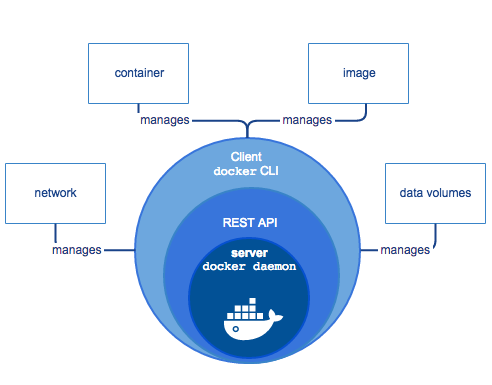
Docker Client 及 Deamon 不需部署在同一台機器上,可以透過遠端遙控其他機器上的 Deamon。
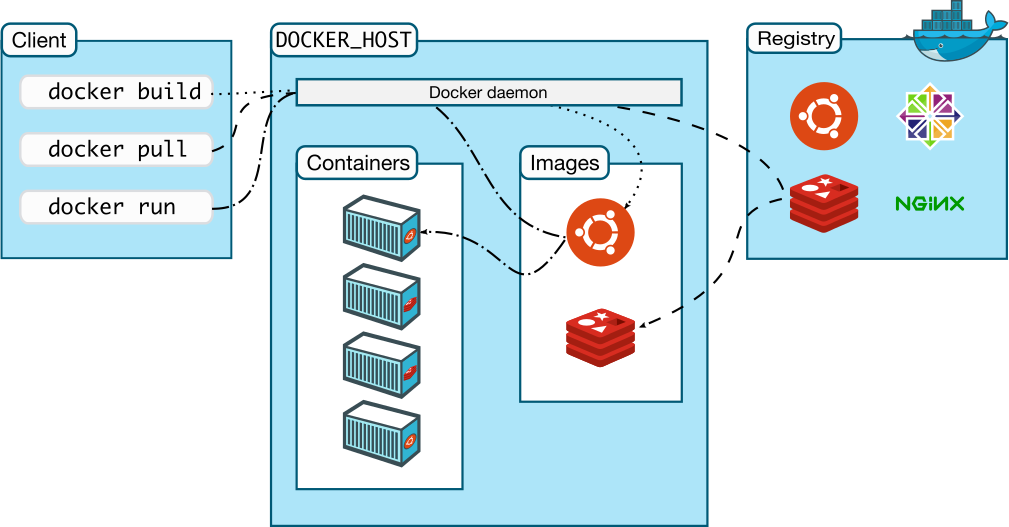
Docker Objects
Images
是個唯獨範本/草稿/藍圖/映像檔(read-only template),用來建立 Docker Container 所需的。
-
Image 內可以引用其他的 Image,例如:
you may build an image which is based on the
ubuntuimage, but installs the Apache web server and your application, as well as the configuration details needed to make your application run. -
可以透過創建 Dockerfile 打造自己的 Image:
Each instruction in a Dockerfile creates a layer in the image. When you change the Dockerfile and rebuild the image, only those layers which have changed are rebuilt. This is part of what makes images so lightweight, small, and fast, when compared to other virtualization technologies.
Containers
是個 Image 的實例(runnable instance of an image),可透過 CLI 控制。
- 相對獨立/孤立於其他 Container 及運行環境。
- Container 內部的環境由 Image 及創建時提供的設定來定義。
- 是個 process runtime。
- 具有獨立的檔案系統(file system)。
Service
Services allow you to scale containers across multiple Docker daemons, which all work together as a swarm with multiple managers and workers. Each member of a swarm is a Docker daemon, and all the daemons communicate using the Docker API. A service allows you to define the desired state, such as the number of replicas of the service that must be available at any given time. By default, the service is load-balanced across all worker nodes. To the consumer, the Docker service appears to be a single application. Docker Engine supports swarm mode in Docker 1.12 and higher.
Container vs VM
| Container | VM |
|---|---|
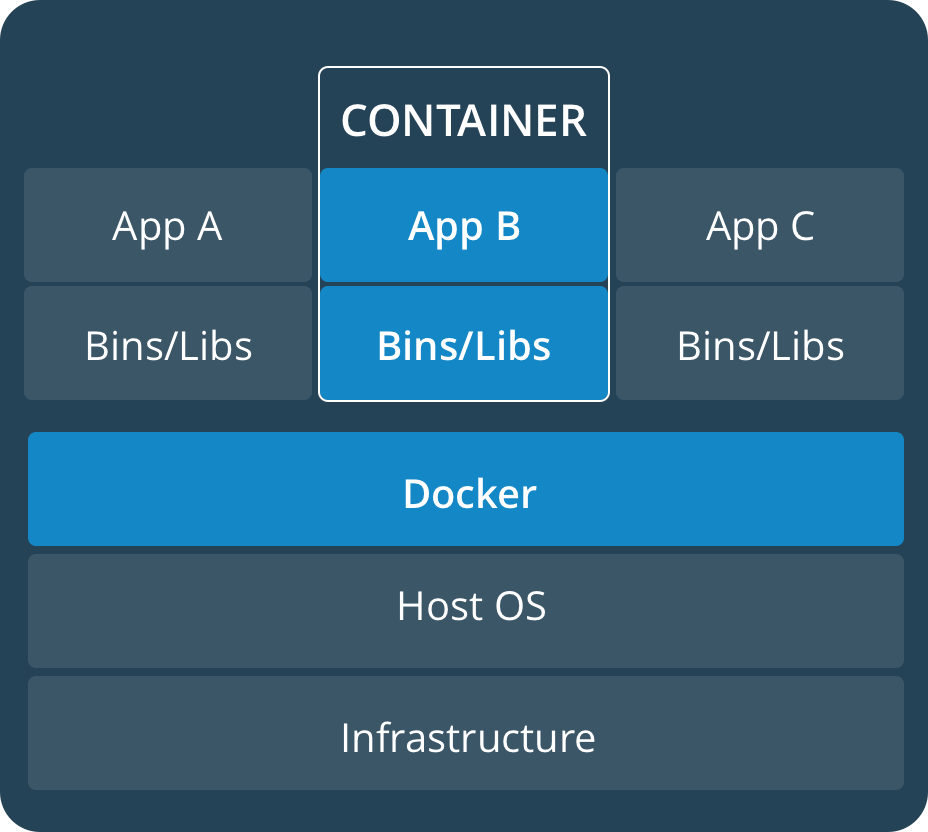 | 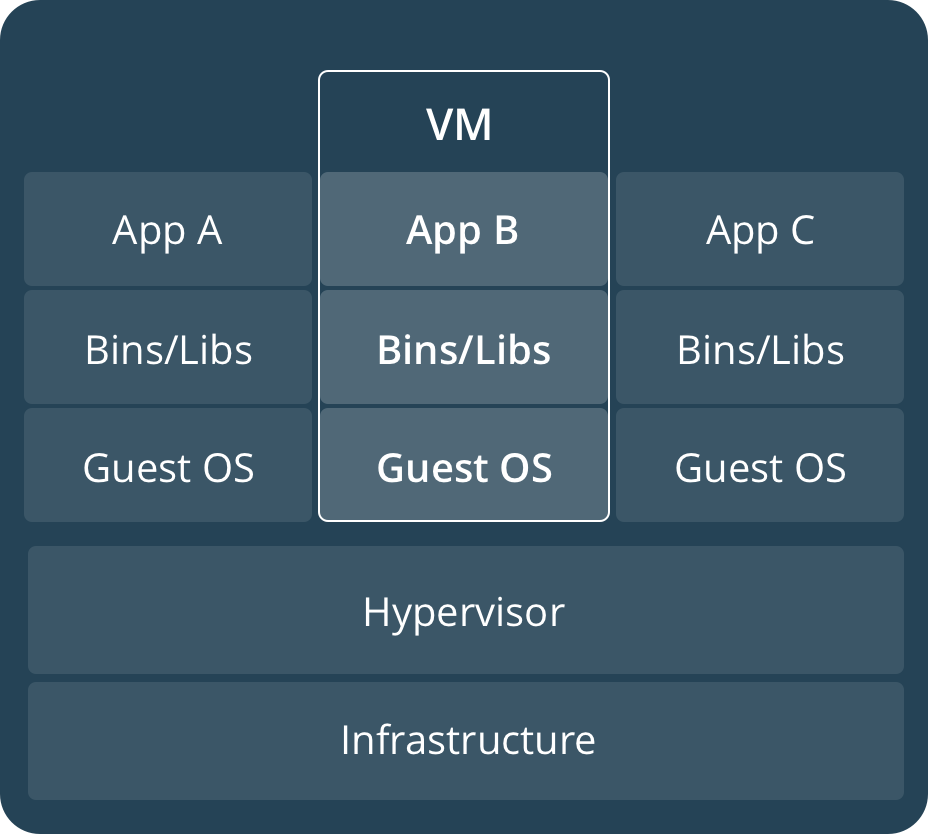 |
| A container runs natively on Linux and shares the kernel of the host machine with other containers. |
Build / Run A Image
Step 1 | 使用 Dockerfile 定義 Image
FROM baseImage
WORKDIR /the/workdir/path
COPY /source /dest
RUN command
CMD ["executable", "parameter"]
FROM:該 Image 相依的 Image。如果為node:latest,則該 Image 中可以執行node指令。WORKDIR:該 Image 中執行的指令都會在該路徑中。COPY:自當前目錄位置複製檔案至該 Image 的WORKDIR。- 可以透過
-fflag 另外定義/source所在的位置。
- 可以透過
RUN:bundle/build 該 Image 時執行的指令。CMD:run/deploy 該 Image 後,在 Container 內執行的指令。
也可以定義 .dockerignore 過濾 COPY 執行時要略過的檔案/路徑/資料夾。
每一行定義/指令都會創建一層 layer
- layer 為 stacked,且每層 layer 都是基於前一層的操作/修改。
- 減少 layer 可以增加 build 效率。
- 開始運行 Container 後,會在最上面加一層可以讀寫的 layer。
- 會建立 layer 的指令:
RUN、COPY、ADD
Step 2 | Build Image
docker build --tag [IMAGE_TAG] [DOCKERFILE_PATH]
--tag name:tag:該 Image 的名稱/標籤。- Format
name:tag。
- Format
Step 3 | Run Container
docker --publish [HOST_PORT]:[CONTAINER_PORT] --detach --name [CONTAINER_NAME] [IMAGE_TAG]
--publish hostPort:containerPort:讓 container 中的指定 port 接到 host 上的指定 port。--detach:讓 Container 在背景執行。--name:定義 Container 的名稱,可以透過該名稱存取 Container。- 沒定義的話只能透過派發的 UUID 存取。
Persistant Data
運行 Container 時,會在 Image 的最後再疊加一層可以讀/寫的 layer。
在 Container 中創建的任何資料會跟著 Container 的刪除而消亡。
如果要將這些資料保留下來,則需要用到 Container Volume 或是 Bind Mount 技術。
Container Volume
將 Container filesystem 中的指定路徑與主機做連結。
- Volumn 創建及內部資料的更新皆由 Docker 管理,不建議直接操作。
- Volume 可以同時用在 Linux 及 Windows 系統。
- Volume 可以安全地被多個 Container 共用。
- 使用 Volume 可以避免 Container 變肥。
創建 Volume
docker volume create [VOLUME_NAME]
Volume 與 Container 連結
docker run -v [VOLUME_NAME]:[FS_PATH_IN_CONTAINER]- 沒有事先
docker create [VOLUME_NAME]也沒關係,Docker 會自己創建。
- 沒有事先
docker run -v [FS_PATH_IN_CONTAINER]:隨著啟動 Container 創建 Anonymous Volume。docker run --mount [MOUNT_CONFIG]
經此設定後,[FS_PATH_IN_CONTAINER] 即與 Volume 同步。
Readonly Volume
docker run -v [VOLUME_NAME]:[FS_PATH_IN_CONTAINER]:ro
看看 Volume 在哪裏
docker volume inspect [VOLUME_NAME]
[
  {
    "CreatedAt": "2019-09-26T02:18:36Z",
    "Driver": "local",
    "Labels": {},
    "Mountpoint": "/var/lib/docker/volumes/VOLUME_NAME/_data",
    "Name": "VOLUME_NAME",
    "Options": {},
  	"Scope": "local"
	}
]
Mountpoint 即為資料儲存的路徑。
- 桌機版的 Docker 實際上是運行在 VM 中的,如果要存取 Volume 中的資料,可能需要先存取 VM 中的環境。
Volume Driver
可以透過 Volume Driver 機制,把 Volume 存在其他機器上。
Bind Mount
將 Container filesystem 中的指定路徑與主機中的指定路徑做連結。
- 使用方式與 Volume,但不交由 Docker 管理。
- 通常用在將資料掛載至 Container 中使用,例如:Server 所需的靜態資源。
資料與 Container 連結
docker run -v [HOST_PATH]:[FS_PATH_IN_CONTAINER]
[HOST_PATH]設定為$(pwd)怎表示為當前路徑。
Multi-Container App
Container 間可以透過網路互相溝通。
可以透過 docker network 輕鬆建制 Container 間的網路。
Step 1. 建立 Docker Network
docker network create [NETWORK_NAME]
Step 2. 將 Container 納入同個 Docker Network 下
-
Contaienr A | Data Server
docker run \
	--network [NETWORK_NAME] \
	--network-alias [ALIAS_FOR_CONTAINER_A]
--network-alias [ALIAS_FOR_CONTAINER_A]定義了
-
Container B | App Server
docker run \ --network [NETWORK_NAME] \ -e DATA_HOST=ALIAS_FOR_CONTAINER_ADATA_HOST被定義為 environment variable,需要在 app 中進行綁定,例如axios.get('http://' + process.env.DATA_HOST + '/list')。但這樣做其實不太安全,可以參考這篇文章。
Docker Compose
簡單的說就是透過定義 .yaml 一次 docker run 多個 app。
- 自動建制
--network - 自動建制
--network-alias
version: "3.7"

services:
	app-server: # 類似 `--name`; 同時用做 `--network-alias`
		image: app-server-image
		ports:
			- 3000:3000
		environment:
			DATA-HOST: data-server
	data-server:
		image: data-server-image
		volumes:
			- data-base:/data/base/path/in/container

volumes:
	data-base:
Scale Up
Network
Docker 中的網路是由可擴充的子系統管理的,稱作 Driver。Docker 內建 3 種 Driver:
-
bridge:預設 Driver。 -
host:Container 的網路不做隔離,直接使用 Host 上的網路。 -
overlay:串連多個 Docker Daemon,允許 Docker Swarm Services 間的溝通。- 允許Swarm Service 及獨立的 Container 間的溝通。
- 允許不同 Daemon 上的獨立 Container 間的溝通。
-
macvlan:指派 MAC Address 給 Container,可以作為實體機器在 Host 上的網路被存取。 -
none:沒有網路。
Bridge
-
會自動取得 Host 上網路相關的設定值(
hosts、resolv.conf)。 -
啟動 Docker 時,會創建一組預設的 Bridge 網路;當 Container 不指定
--network時,會使用該組 Bridge 網路。 -
Bridge 網路內部有自己的 DNS 解析,可以透過定義
--network-alias作為 Container 在 Bridge 網路中的 Domain Name。
Concept
What is Kubernetes
用來管理 App 的備援(Replica 的管理)。
- 平衡負載。
- Storage Orchestration。
- 自動降版。
- Automatic bin packing:可以定義每個 container 可以存取的 CPU 及 RAM。
- 自動修復:如果 App 掛了,會自動重啟 container 並取代之。
- 敏感資料管理。
Control Plane Component
由數個小型服務組成,這些小型服務不需要建置在同台機器上。
- kube-apiserver:Kubernetes API server,可以不只一顆。
- etcd:用來儲存所有 cluster 的 data(應該是設定檔)。
- 簡單的鍵值對。
- kube-scheduler:用來管理新建的 pods 要放到哪個 node 去。
- kube-controller-manager:
- Node Controller
- Replication Controller
- Endpoints Controller
- Service Account & Token Controllers
- cloud-controller-manager
Node Component
跑在 Node 上,管理運行中的 Pod、提供 K8S 需要的 Runtime 環境。
- kubelet:負責管理 Pod 及其中的 Container。
- 依照 PodSpec 管理 Pod。
- kube-proxy:管理 Node 上的網路,讓網路能夠跟 Pod 通訊。
- Container runtime
Addon
好像沒什麼好說的... 就是可以裝 addon 的意思...
Cluster
由一個 Master, 即至少 1 個 Node 組成。
Master
管理整個 Cluster 及 Nodes。
Node
用來執行 Cluster 的業務/工作。
- 運行容器化的 App。
- 可以是個 VM、實體電腦。
- kubelet:用來管理 Node 並與 Master 溝通。
- 使用 Kubernetes API 與 Master 溝通
- 包含管理 Container 的工具,例如:Containerd、Docker。
Kubernetes Deployment
用來告訴 Kubernetes 如何建立/更新 App(應用程式)的 Instances。
- 創建 Instance 後,Kubernetes Deployment Controller 會持續監控 Instance。如果該 Instance 壞掉,Controller 會用其他 Node 上的 Instance 替代。
- Deployment 會創建 Pod(s) 來管理 App Instancec。
kubectl create deployment [DEPLOYMENT_NAME] --image=[DOCKER IMAGE]
建立 Deployment 並部署 App(應用程式)。
- Step 1. 搜尋合適的 Node 。
- Step 2. 安排(schedule)運行 App 在該 Node 上。
- Step 3. 控制 Cluster 以在需要的時候重新安排(reschedule)App Instance。
kubectl delete deployment [DEPLOYMENT_NAME]
刪除 Deployment。
Viewing Pods and Nodes
Pod
- 內含至少 1 個 Containerized App。
- 內含用以管理內部 Apps 的資訊。例如:Image Version、Ports 的使用狀況。
- Pod 內的 Apps 共用儲存空間(ex. Volumn)。
- Pod 內的 Apps 共用 Cluster 派發的 IP 及 Port。
- 有生命週期,跟著 Node。
範例:
一 Pod 內包含
- Container 執行 Node.js app server
- Container 執行 Node.js data server
app server 自 data server 獲取需要的資訊
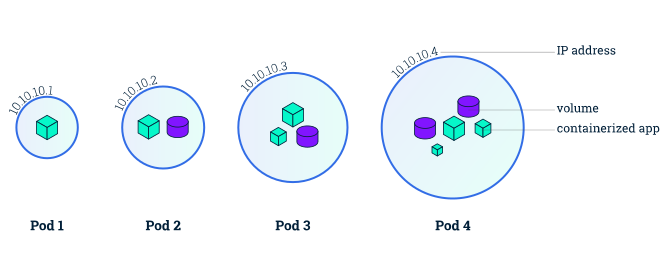
kubelet get pods
取得所有 pods 的列表
kubelet describe pods
取得所有 pods 的資訊
kubelet logs [POD_NAME]
印出 pod 中的 log
kubelet exec [POD_NAME] -- [CMD]
在 pod 中執行 commandline 指令
Node
- 用來運行 Pod。
- 一個 Node 上可以運行多個 Pod。
- 可為 VM、實體電腦。
- 至少包含:
- Kubelet:與 Master 溝通;並管理旗下的 Pods、Container Runtime。
- Container Runtime:用以運行 App。
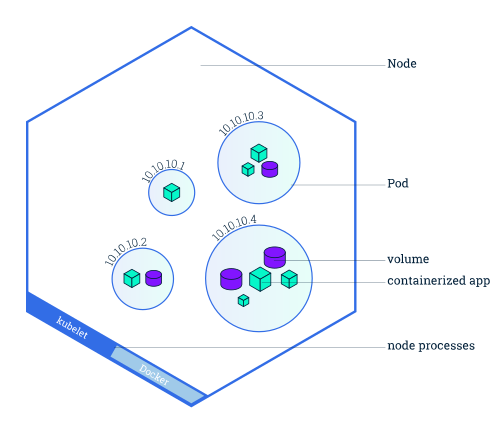
Service
A Kubernetes Service is an abstraction layer which defines a logical set of Pods and enables external traffic exposure, load balancing and service discovery for those Pods.
- 可以透過
.ymal檔定義。 - 解開 Pods 間的耦合。
- 可以用 LabelSelector 來控制 Service 要用哪一組 Pods。
Export Pod IP
可以透過定義 ServiceSpec 的 type,來進行 export。type 有以下幾種類型:
-
ClusterIP:預設值;只能在 Cluster 中存取 Service。
-
NodePort:
[NODE_IP]:[NODE_PORT],ClusterIP 的父集合。 -
LoadBalancer:固定 IP,NodePort 的父集合。
-
ExternalName:有點類似自定義的 DNS 的 Domain Name。
從 Deployment 到 Service
- Step 1:創建 Deployment
- Step 2:
kubectl expose deployments/[DEPLOYMENT_NAME] --type=[SERVICE_TYPE] --port=[EXPORTED_PORT][SERVICE_TYPE]:ClusterIP、NodePort、LoadBalancer、ExternalName[EXPORTED_PORT]:Pod 中要被外部存取的 port
kubectl describe services/[DEPLOYMENT_NAME] 中的 NodePort 即可透過 localhost:XXXX 存取。
透過上述方式創建的 Service 會由 K8S 指派 Label app=[DEPLOYMENT_NAME] 一樣。
可以透過 kubectl delete service [SERVICE_NAME] 刪除 service
增加 App 的分身 (Replica)
增加 App 的分身(Replicas);也就是增加 Pod。
kubectl scale deployments/[DEPLOYMENT_NAME] --replicas=[NUMBER]
更新 App
Kubernetes 更新 app 時為漸進式的,能夠在服務不中斷的情況下進行升級。
- Kubernetes 會逐一的替換掉 Deployments 中的 Pod:創建一新版 App 的 Pod 後,關掉一舊版 App 的 Pod。
- 更新過程中新舊版的 App 都有可能連到,端看 Kubernetes 的調度。
kubectl set deployments/[DEPLOYMENT_NAME] [IMAGE_NAME]=[NEW_IMAGE_WITH_VERSON_CODE]
Kubernetes Object
為 K8S 中的持久性實體(Persistent Entity),用以表示 Cluster 中的狀態。K8S Object 說明了:
- 正在運行哪個容器化 App
- 該 App 的可用資源
- 該 App 的行為,例如:重啟規則、更新規則、失敗容許等...
一旦創建 K8S Object,K8S 會確保 Object 存續。
Object Spec and Status
- Spec:用來描述/定義 Object 的行為,在創建 Object 時提供。
- Status:用來描述 Object 的狀態,由 K8S 管理。
定義 Object
創建 Object 時,一定要提供 Spec。可以透過 K8S API 創建 Object,可以在此時以 API 參數,或是 yaml 檔案定義 Spec。
yaml 必填
- apiVersion:K8S API 版本
- kind:K8S Object 類型,例如:Pod、Deployment、Service
- metadata:協助用來識別 Object 的資料
- spec:Object 的內容物
Object Name and IDs
每個 K8S Object 都有個 Name 跟 UID。
Name
- 相同 type 中唯一,可自訂。
- 如果 Name 作為 DNS Subdomain 使用,須符合以下規則:
- 少於 253 字元
- 只能小寫字母及
- - 開頭結尾皆為字母
- 如果 Name 作為 DNS Label 使用,須符合以下規則:
- 少於 63 字元
- 只能小寫字母及
- - 開頭結尾皆為字母
- 如果 Name 作為 Path Segment 使用,只能使用小寫字母及
-
UID
Cluster 中唯一,由 K8S 派發。
Namespace
Cluster 中的 Virtual Cluster。適合用在多組團隊/多專案共用 Cluster 的情況。
- Name 只需在 Namespace 中唯一即可;跨 Namespace 重複沒有關係。
- 大多數的 K8S 服務都在 Namespace 中;除了 Nodes。
DNS
創建 Service 時,同時會創建 DNS Entry,以 <service-name>.<namespace>.svc.cluster.local 呈現。